DeepIntShield offers two powerful methods for routing requests across AI providers, each serving different use cases:
Governance-based Routing : Explicit, user-defined routing rules configured via Virtual KeysAdaptive Load Balancing : Automatic, performance-based routing powered by real-time metrics (Enterprise feature)
When both methods are available, governance takes precedence because users have explicitly defined their routing preferences through provider configurations on Virtual Keys.
The Model Catalog is DeepIntShield’s central registry that tracks which models are available from which providers. It powers both governance-based routing and adaptive load balancing by maintaining an up-to-date mapping of models to providers.
Architecture Documentation : For detailed technical documentation on the Model Catalog implementation, including API reference, thread safety, and advanced usage patterns, see Model Catalog Architecture .
The Model Catalog combines two data sources to maintain a comprehensive and up-to-date model registry:
Pricing Data (Primary source)
Downloaded from a remote URL (configurable, defaults to https://getbifrost.ai/datasheet)
Contains model names, pricing tiers, and provider mappings
Synced to database on startup and refreshed periodically (default: every 24 hours)
Used for cost calculation and initial model-to-provider mapping
Stored as : In-memory map pricingData[model|provider|mode] for O(1) lookups
Provider List Models API (Secondary source)
Calls each provider’s /v1/models endpoint during startup
Enriches the catalog with provider-specific models and aliases
Re-fetched when providers are added/updated via API or dashboard
Adds models that may not be in pricing data yet (e.g., newly released models)
Stored as : In-memory map modelPool[provider][]models
DeepIntShield uses a sophisticated multi-step process to determine if a model is available for a provider:
GetModelsForProvider(provider) Purpose : Find all models available for a specific provider
Lookup Process :
Check modelPool[provider] for direct matches
Return all models in that provider’s slice
Example :
models := GetModelsForProvider ( " openai " )
// Returns: ["gpt-4o", "gpt-4o-mini", "gpt-4-turbo", "gpt-3.5-turbo", ...]
Used by :
Routing Methods to validate allowed_models
Dashboard model selector dropdowns
API responses for /v1/models?provider=openai
GetProvidersForModel(model) Purpose : Find all providers that support a specific model
Lookup Process :
Direct lookup : Check each provider’s model list in modelPoolCross-provider resolution : Apply special handling for proxy providers Special Cross-Provider Rules :
If model is not found directly, check if provider/model exists in OpenRouter
// Request: claude-3-5-sonnet
// Checks: openrouter models for "anthropic/claude-3-5-sonnet"
// Result: Adds "openrouter" to providers list
If model is not found directly, check if provider/model exists in Vertex
// Request: claude-3-5-sonnet
// Checks: vertex models for "anthropic/claude-3-5-sonnet"
// Result: Adds "vertex" to providers list
For GPT models, check if openai/model exists in Groq
// Checks: groq models for "openai/gpt-3.5-turbo"
// Result: Adds "groq" to providers list
For Claude models, check Bedrock with flexible matching
// Request: claude-3-5-sonnet
// Checks: bedrock models containing "claude-3-5-sonnet"
// Matches: "anthropic.claude-3-5-sonnet-20240620-v1:0"
// Result: Adds "bedrock" to providers list
Example :
providers := GetProvidersForModel ( " claude-3-5-sonnet " )
// Returns: ["anthropic", "vertex", "bedrock", "openrouter"]
// Even though the request was just "claude-3-5-sonnet"!
Used by :
Load balancing to find candidate providers
Fallback generation
Model validation in requests
Pricing Lookup with Fallbacks Purpose : Get pricing data for cost calculation and model validation
Lookup Key : model|provider|mode (e.g., gpt-4o|openai|chat)
Fallback Chain :
Primary lookup : model|provider|requestTypeGemini → Vertex : If Gemini not found, try Vertex with same modelVertex format stripping : For provider/model, strip prefix and retryBedrock prefix handling : For Claude models, try with anthropic. prefixResponses → Chat : If Responses mode not found, try Chat mode Example Flow :
// Request: claude-3-5-sonnet on Gemini (Responses API)
// 1. Try: claude-3-5-sonnet|gemini|responses → Not found
// 2. Try: claude-3-5-sonnet|vertex|responses → Not found
// 3. Try: claude-3-5-sonnet|vertex|chat → ✅ Found!
// Pricing returned from vertex/chat mode
Used by :
Cost calculation for billing
Model validation during routing
Budget enforcement
Initial Sync (Startup) When DeepIntShield starts, it performs a complete model catalog initialization:
Step-by-step process (from server.go:Bootstrap()):
pricingData := loadPricingFromURL ( ctx )
// 2. Store in database (if configStore available)
configStore . CreateModelPrices ( ctx , pricingData )
// 3. Load into memory cache
mc . pricingData = map [ string ]TableModelPricing{ ... }
// Build modelPool from pricing data
mc . populateModelPoolFromPricingData ()
// Result: modelPool[provider] = [models from pricing]
// Call ListAllModels for all configured providers
modelData , err := client . ListAllModels ( ctx , nil )
// Add results to model pool
mc . AddModelDataToPool ( modelData )
// Result: modelPool enriched with provider-specific models
If list models API fails for a provider:
{ "level" : " warn " , "message" : " failed to list models for provider ollama: connection refused " }
Logged as warning, does not stop startup
Provider remains usable with models from pricing data
Can be manually refreshed later via API
Result : DeepIntShield is ready with a comprehensive model catalog combining both sources.
Ongoing Sync (Background) While DeepIntShield is running, the catalog stays up-to-date through background workers:
Pricing Data Sync :
Background worker runs every 1 hour (ticker interval)
Checks if 24 hours have elapsed since last sync (configurable)
If yes, downloads fresh pricing data and updates database + memory cache
Timer resets after successful sync
List Models API Sync :
Triggered by these events:
Provider Added : When a new provider is configured
# Automatically calls ListModels for the new provider
Provider Updated : When provider config changes (keys, endpoints, etc.)
PUT /api/v1/providers/ \{ provider \}
# Refetches models to detect changes
Manual Refresh : Via API endpoint
POST /api/v1/providers/ \{ provider \} /models/refetch
# Explicitly refetches models for a provider
Manual Delete + Refetch : Clear and reload models
DELETE /api/v1/providers/ \{ provider \} /models
POST /api/v1/providers/ \{ provider \} /models/refetch
# Useful when models are out of sync
Failure Handling :
Pricing URL fails but database has data → Use cached database records
Pricing URL fails and no database data → Error logged, existing memory cache retained
List models API fails → Log warning, retain existing model pool entries
Fallback Strategy DeepIntShield’s multi-layered approach ensures high availability:
Layer 1: Pricing Data Persistence
URL fails → Database → Memory cache → Continue operation
Layer 2: Model Pool Redundancy
ListModels fails → Pricing data models → Continue with reduced catalog
Layer 3: Runtime Validation
Model not in catalog → Special cross-provider rules → May still work
Example Scenario :
- OpenAI ListModels API is down
- User requests gpt-4o on OpenAI
DeepIntShield's Response:
1. ✅ Pricing data available from database (last sync 12h ago)
2. ✅ Model pool has gpt-4o from previous ListModels call
3. ✅ Request proceeds normally
4. 📊 Cost calculated from cached pricing data
This design ensures requests never fail due to sync issues as long as one data source is available.
The allowed_models field in provider configs controls which models can be used with that provider. Understanding its behavior is crucial for governance routing.
Configuration :
"allowed_models" : [], // Empty = defer to catalog
Behavior :
DeepIntShield calls GetModelsForProvider("openai")
Returns all models in modelPool["openai"]
Request validated against catalog
Examples :
curl -H " x-bf-vk: vk-123 " -d ' {"model": "gpt-4o"} '
curl -H " x-bf-vk: vk-123 " -d ' {"model": "gpt-3.5-turbo"} '
# ❌ Rejected (not in OpenAI catalog)
curl -H " x-bf-vk: vk-123 " -d ' {"model": "claude-3-5-sonnet"} '
Use Cases :
Default behavior for most deployments
Automatically stays up-to-date with provider’s model offerings
No manual model list maintenance required
Configuration :
"allowed_models" : [ " gpt-4o " , " gpt-4o-mini " ], // Only these two
"allowed_models" : [ " claude-3-5-sonnet-20241022 " ], // Specific version
Behavior :
DeepIntShield validates request model against explicit list
Catalog is ignored for this provider
Supports both direct matches and provider-prefixed entries
Case-sensitive matching
Examples :
# ✅ Allowed (in explicit list)
curl -H " x-bf-vk: vk-123 " -d ' {"model": "gpt-4o"} '
# ❌ Rejected (not in explicit list)
curl -H " x-bf-vk: vk-123 " -d ' {"model": "gpt-4-turbo"} '
# Even though gpt-4-turbo is in the OpenAI catalog!
# ✅ Allowed (exact match for Anthropic)
curl -H " x-bf-vk: vk-123 " -d ' {"model": "claude-3-5-sonnet-20241022"} '
# ❌ Rejected (version mismatch)
curl -H " x-bf-vk: vk-123 " -d ' {"model": "claude-3-5-sonnet-20240620"} '
Provider-Prefixed Entries :
You can also use provider-prefixed model names in allowed_models. DeepIntShield will strip the prefix and match against the requested model:
"provider" : " openrouter " ,
"allowed_models" : [ " openai/gpt-4o " , " anthropic/claude-3-5-sonnet " ],
How it works :
curl -H " x-bf-vk: vk-123 " -d ' {"model": "gpt-4o"} '
# 1. Checks: "openai/gpt-4o" in allowed_models
# 2. Strips prefix: "openai/gpt-4o" → "gpt-4o"
# 3. Compares: "gpt-4o" == "gpt-4o" ✅
# 4. Result: Allowed and routed to OpenRouter
This is particularly useful for proxy providers (OpenRouter, Vertex) where you want to explicitly control which upstream models are accessible.
Use Cases :
Compliance requirements (only approved models)
Cost control (restrict to cheaper models)
Version pinning (prevent automatic updates)
Testing specific model versions
Explicit cross-provider routing (e.g., only allow OpenAI models via OpenRouter) Key Concept : Deployments are key-specific mappings that allow user-friendly model names to map to provider-specific deployment identifiers.
How Deployments Work :
Defined at the Key level , not Virtual Key level
Structure: deployments: {"alias": "deployment-id"}
Alias (left side): User-facing model name used in requestsDeployment ID (right side): Provider-specific identifier sent to the API Azure OpenAI Example :
Provider configuration with deployment mapping:
"name" : " azure-prod-key " ,
"models" : [], // Not used when deployments exist
"endpoint" : " https://your-resource.openai.azure.com " ,
"gpt-4o" : " my-prod-gpt4o-deployment " ,
"gpt-4o-mini" : " my-mini-deployment "
What Happens :
Allowed models derived from aliases : ["gpt-4o", "gpt-4o-mini"]User requests with alias : {"model": "gpt-4o"}DeepIntShield validates : gpt-4o is in derived allowed models ✅DeepIntShield maps to deployment : gpt-4o → my-prod-gpt4o-deploymentSent to Azure : Uses my-prod-gpt4o-deployment as the deployment namePricing lookup : If pricing for deployment not found, falls back to alias gpt-4o Bedrock Example with Inference Profiles :
"access_key" : " your-access-key " ,
"secret_key" : " your-secret-key " ,
"claude-sonnet" : " us.anthropic.claude-3-5-sonnet-20241022-v2:0 " ,
"claude-opus" : " us.anthropic.claude-3-opus-20240229-v1:0 "
What Happens :
Allowed models : ["claude-sonnet", "claude-opus"] (from deployment aliases)User requests : {"model": "claude-sonnet"}DeepIntShield validates : claude-sonnet in allowed models ✅Maps to inference profile : claude-sonnet → us.anthropic.claude-3-5-sonnet-20241022-v2:0Sent to Bedrock : Full ARN used in API call Priority of Model Restrictions :
When determining allowed models for a key:
1. If key.models is NOT empty → Use key.models
2. Else if deployments exist → Use deployment aliases (map keys)
3. Else → All models allowed (use Model Catalog)
Example with Both :
"models" : [ " gpt-4o " , " gpt-3.5-turbo " ], // Explicit restriction
"gpt-4o" : " my-deployment " ,
"gpt-4-turbo" : " another-deployment " // NOT accessible!
Result: Only ["gpt-4o", "gpt-3.5-turbo"] allowed (models field takes priority)
Vertex Example (similar pattern):
"project_id" : " my-project " ,
"claude-3-5-sonnet" : " anthropic/claude-3-5-sonnet@20241022 " ,
"gemini-pro" : " google/gemini-1.5-pro "
Use Cases for Deployments :
Azure : Map generic model names to specific deployment names in your Azure resourceBedrock : Use short aliases for long inference profile ARNsVertex : Map to specific model versions or regional endpointsMulti-environment : Different deployments per key (dev/staging/prod) Key Insight :
User Request: {"model": "gpt-4o"}
Validation: Check if "gpt-4o" in allowed models (derived from deployments)
Mapping: deployments["gpt-4o"] → "my-prod-gpt4o-deployment"
API Call: Uses "my-prod-gpt4o-deployment" as deployment ID
Pricing: Falls back to "gpt-4o" if deployment not in pricing data
This allows user-friendly model names in requests while supporting provider-specific deployment patterns at the key level.
Configuration :
"allowed_models" : [ " gpt-4o " ],
"allowed_models" : [ " gpt-4o " ],
Request :
curl -H " x-bf-vk: vk-123 " \
Routing Behavior :
Model validation : Both providers have gpt-4o in allowed_models ✅Weighted selection : 50% chance eachProvider selected : Let’s say AzureModel transformation : gpt-4o → azure/gpt-4oFallbacks : ["openai/gpt-4o"] (remaining providers) Special Cross-Provider Scenarios :
"provider" : " openrouter " ,
"allowed_models" : [] // Use catalog
Request claude-3-5-sonnet:
DeepIntShield checks: GetModelsForProvider("openrouter")
Finds: anthropic/claude-3-5-sonnet in OpenRouter catalog
✅ Allowed, routes to OpenRouter
Use Case : Route 99% of OpenAI traffic through OpenRouter for cost savings, keep 1% direct for fallback
"allowed_models" : [ " gpt-4o " ],
"weight" : 0.01 // 1% direct to OpenAI
"provider" : " openrouter " ,
"allowed_models" : [ " openai/gpt-4o " ], // Provider-prefixed
"weight" : 0.99 // 99% via OpenRouter
Request gpt-4o:
OpenAI check : "gpt-4o" in ["gpt-4o"] → ✅ AllowedOpenRouter check : Strips prefix from "openai/gpt-4o" → matches "gpt-4o" → ✅ AllowedWeighted selection : 99% chance → OpenRouter selectedFinal model : openrouter/gpt-4oFallbacks : ["openai/gpt-4o"] (1% provider as fallback) Why this works : DeepIntShield now supports provider-prefixed entries in allowed_models, so "openai/gpt-4o" matches requests for "gpt-4o".
"allowed_models" : [ " claude-3-5-sonnet " , " gemini-1.5-pro " ]
Request claude-3-5-sonnet:
Model catalog lookup: GetProvidersForModel("claude-3-5-sonnet")
Finds: ["anthropic", "vertex", "bedrock"]
Validation: claude-3-5-sonnet in allowed_models ✅
Sends to Vertex as: anthropic/claude-3-5-sonnet
"allowed_models" : [ " gpt-3.5-turbo " ]
Request gpt-3.5-turbo:
Special handling: Checks Groq catalog for openai/gpt-3.5-turbo
✅ Found, validation passes
Sends to Groq as: openai/gpt-3.5-turbo
When a Virtual Key has provider_configs, governance uses the model catalog for validation:
Empty allowed_models Example :
"allowed_models" : [], // Use catalog
Request Flow :
curl -H " x-bf-vk: vk-123 " -d ' {"model": "gpt-4o"} '
# 1. Governance checks: Is "gpt-4o" in GetModelsForProvider("openai")?
# 2. Catalog lookup: modelPool["openai"] contains "gpt-4o" ✅
# 3. Validation passes, provider selected
# 4. Model becomes: "openai/gpt-4o"
Rejection Example :
curl -H " x-bf-vk: vk-123 " -d ' {"model": "claude-3-5-sonnet"} '
# 1. Governance checks: Is "claude-3-5-sonnet" in GetModelsForProvider("openai")?
# 2. Catalog lookup: modelPool["openai"] does NOT contain "claude-3-5-sonnet" ❌
# 3. Validation fails, request rejected
# 4. Error: "model not allowed for any configured provider"
When load balancing selects providers, it queries the catalog to find candidates:
Request Flow :
curl -X POST http://localhost:8080/v1/chat/completions \
-d ' {"model": "gpt-4o", "messages": [...]} '
# 1. Load balancer: GetProvidersForModel("gpt-4o")
# 2. Catalog returns: ["openai", "azure", "groq"]
# 3. Filter by configured providers: ["openai", "azure"] (groq not configured)
# 4. Performance scoring: openai=0.95, azure=0.87
# 5. Select: openai (highest score)
# 6. Model becomes: "openai/gpt-4o"
# 7. Fallbacks: ["azure/gpt-4o"]
Cross-Provider Discovery :
curl -d ' {"model": "claude-3-5-sonnet"} '
# 1. Load balancer: GetProvidersForModel("claude-3-5-sonnet")
# - Direct: ["anthropic"] ✅
# - OpenRouter: Has "anthropic/claude-3-5-sonnet" ✅
# - Vertex: Has "anthropic/claude-3-5-sonnet" ✅
# - Bedrock: Has "anthropic.claude-3-5-sonnet-..." ✅
# 3. Catalog returns: ["anthropic", "openrouter", "vertex", "bedrock"]
# 4. Performance scoring across all four
# 5. Best performer selected
This is how DeepIntShield achieves intelligent cross-provider routing without manual configuration.
Model Catalog is essential for cross-provider routing . Without it, DeepIntShield wouldn’t know that gpt-4o is available from OpenAI, Azure, and Groq, or that claude-3-5-sonnet can be routed through Anthropic, Vertex, Bedrock, and OpenRouter. This knowledge powers both governance validation and load balancing provider discovery.
Governance-based routing allows you to explicitly define which providers and models should handle requests for a specific Virtual Key. This method provides precise control over routing decisions.
When a Virtual Key has provider_configs defined:
Request arrives with a Virtual Key (e.g., x-bf-vk: vk-prod-main)Model validation : DeepIntShield checks if the requested model is allowed for any configured providerProvider filtering : Providers are filtered based on:
Model availability in allowed_models
Budget limits (current usage vs max limit)
Rate limits (tokens/requests per time window)
Weighted selection : A provider is selected using weighted random distributionProvider prefix added : Model string becomes provider/model (e.g., openai/gpt-4o)Fallbacks created : Remaining providers sorted by weight (descending) are added as fallbacks
"allowed_models" : [ " gpt-4o " , " gpt-4o-mini " ],
"allowed_models" : [ " gpt-4o " ],
"token_max_limit" : 100000 ,
"token_reset_duration" : " 1m "
curl -X POST http://localhost:8080/v1/chat/completions \
-H " x-bf-vk: vk-prod-main " \
-d ' {"model": "gpt-4o", "messages": [...]} '
OpenAI: ✅ Has gpt-4o in allowed_models, budget OK, weight 0.3
Azure: ✅ Has gpt-4o in allowed_models, rate limit OK, weight 0.7
70% chance → Azure
30% chance → OpenAI
"fallbacks" : [ " openai/gpt-4o " ]
Feature Description Explicit Control Define exactly which providers and models are accessible Budget Enforcement Automatically exclude providers exceeding budget limits Rate Limit Protection Skip providers that have hit rate limits Weighted Distribution Control traffic distribution with custom weights Automatic Fallbacks Failed providers automatically retry with next highest weight
Cost Optimization Assign higher weights to cheaper providers for cost-sensitive workloads:
{ "provider" : " groq " , "weight" : 0.7 },
{ "provider" : " openai " , "weight" : 0.3 }
Environment Separation Create different Virtual Keys for dev/staging/prod with different provider access:
"provider_configs" : [{ "provider" : " ollama " }]
"provider_configs" : [{ "provider" : " openai " }, { "provider" : " azure " }]
Compliance & Data Residency Restrict specific Virtual Keys to compliant providers:
{ "provider" : " azure " , "allowed_models" : [ " gpt-4o " ]},
{ "provider" : " bedrock " , "allowed_models" : [ " claude-3-sonnet-20240229 " ]}
Empty allowed_models : When left empty, DeepIntShield uses the Model Catalog (populated from pricing data and the provider’s list models API) to determine which models are supported. See the Model Catalog section above for how syncing works. For configuration instructions, see Governance Routing .
Adaptive Load Balancing automatically optimizes routing based on real-time performance metrics. It operates at two levels to provide both macro-level provider selection and micro-level key optimization.
Why Two Levels?
Separating provider selection (direction) from key selection (route) enables:
Provider-level optimization : Choose the best provider for a model based on aggregate performanceKey-level optimization : Within that provider, choose the best API key based on individual key performanceResilience : Even when provider is specified (by governance or user), key-level load balancing still optimizes which API key to use
Request["Request: gpt-4o"]
subgraph Level1["Level 1: Direction (Provider Selection)"]
Cat["Model Catalog Lookup"]
Providers["Candidate Providers:<br/>openai, azure, groq"]
Filter["Filter by allowed_models<br/>and key availability"]
Score["Score by performance:<br/>error rate, latency, utilization"]
subgraph Level2["Level 2: Route (Key Selection)"]
Keys["Available OpenAI Keys:<br/>key-1, key-2, key-3"]
KeyScore["Score each key:<br/>error rate, latency, TPM hits"]
KeySelect["Select: key-2<br/>(best performing)"]
Request --> Cat --> Providers --> Filter --> Score --> Select
Select --> Keys --> KeyScore --> KeySelect --> Response["Execute with<br/>openai/gpt-4o + key-2"]
When it runs : Only when the model string has no provider prefix (e.g., gpt-4o)
How it works :
Model catalog lookup : Find all configured providers that support the requested modelProvider filtering : Filter based on:
Allowed models from keys configuration
Keys availability for the provider
Performance scoring : Calculate scores for each provider based on:
Error rates (50% weight)
Latency (20% weight, using MV-TACOS algorithm)
Utilization (5% weight)
Momentum bias (recovery acceleration)
Smart selection : Choose provider using weighted random with jitter and explorationFallbacks created : Remaining providers sorted by performance score (descending) are added as fallbacks
When it runs : Always , even when provider is already specified (by governance, user, or Level 1)
How it works :
Get available keys : Fetch all keys for the selected providerFilter by configuration : Apply model restrictions from key configurationPerformance scoring : Calculate score for each key based on:
Error rates (recent failures)
Latency (response time)
TPM hits (rate limit violations)
Current state (Healthy, Degraded, Failed, Recovering)
Weighted random selection : Choose key with exploration (25% chance to probe recovering keys)Circuit breaker : Skip keys with zero weight (TPM hits, repeated failures)
The load balancer computes a performance score for each provider-model combination:
Score = (P_{error} \times 0.5) + (P_{latency} \times 0.2) + (P_{util} \times 0.05) - M_{momentum}
curl -X POST http://localhost:8080/v1/chat/completions \
-d ' {"model": "gpt-4o", "messages": [...]} '
Providers supporting gpt-4o: [openai, azure, groq]
OpenAI: Score 0.92 (low latency, 99% success rate)
Azure: Score 0.85 (medium latency, 98% success rate)
Groq: Score 0.65 (high latency recently)
OpenAI selected (highest score within jitter band)
"model" : " openai/gpt-4o " ,
"fallbacks" : [ " azure/gpt-4o " , " groq/gpt-4o " ]
Feature Description Automatic Optimization No manual weight tuning required Real-time Adaptation Weights recomputed every 5 seconds based on live metrics Circuit Breakers Failing routes automatically removed from rotation Fast Recovery 90% penalty reduction in 30 seconds after issues resolve Health States Routes transition between Healthy, Degraded, Failed, and Recovering Smart Exploration 25% chance to probe potentially recovered routes
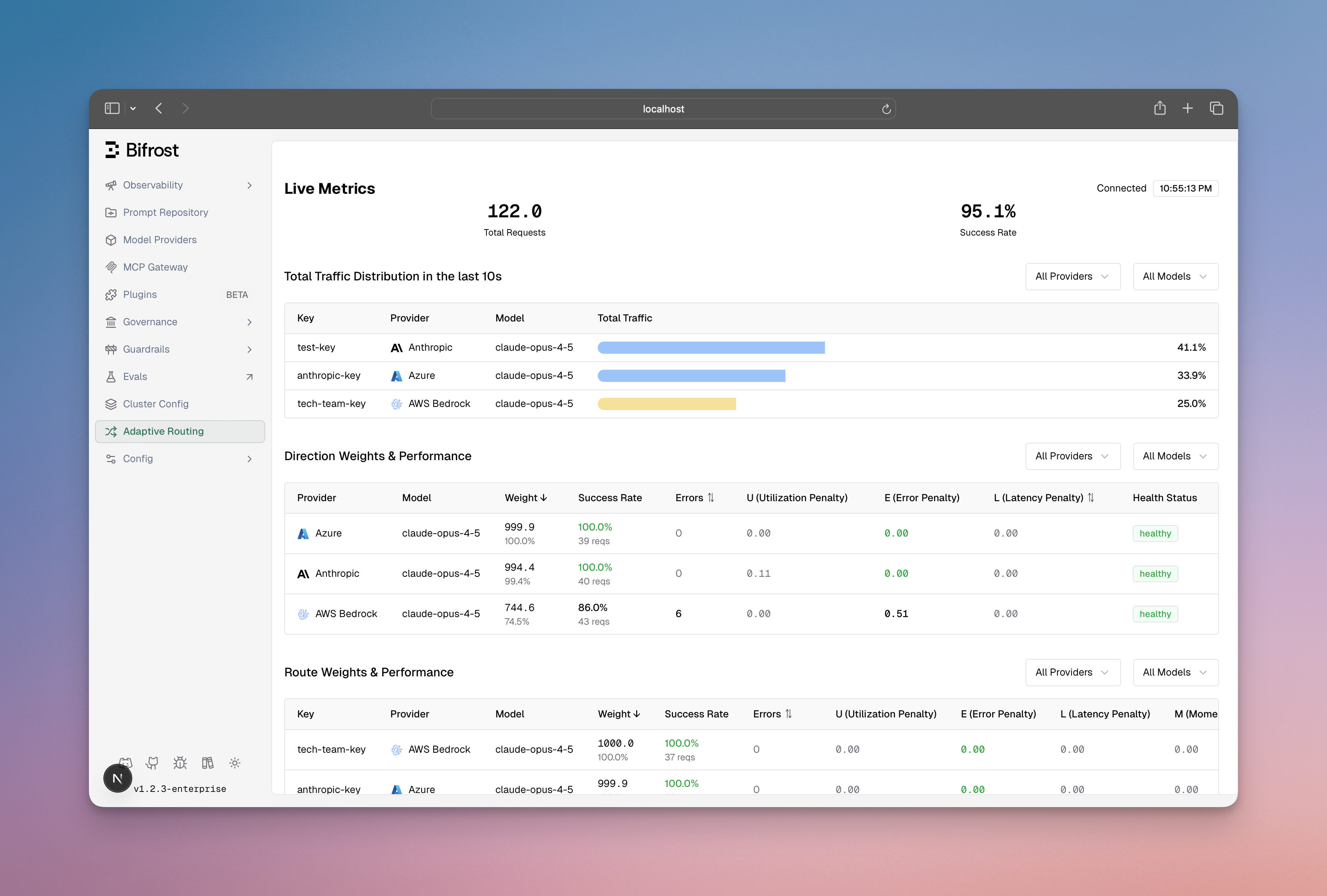
Monitor load balancing performance in real-time:
The dashboard shows:
Weight distribution across provider-model-key routes
Performance metrics (error rates, latency, success rates)
State transitions (Healthy → Degraded → Failed → Recovering)
Actual vs expected traffic distribution
When both methods are available in your DeepIntShield deployment, they work together in a complementary way across two levels.
subgraph Governance["Governance Plugin (HTTPTransportIntercept)"]
HasVK{"Has VK with<br/>provider_configs?"}
GovRoute["Provider Selection:<br/>Weighted random"]
AddPrefix["Add prefix:<br/>azure/gpt-4o"]
subgraph LB1["Load Balancer Level 1 (Middleware)"]
PrefixCheck{"Has provider<br/>prefix?"}
LBProvider["Provider Selection:<br/>Performance-based"]
AddLBPrefix["Add prefix:<br/>openai/gpt-4o"]
subgraph LB2["Load Balancer Level 2 (Key Selector)"]
GetKeys["Get available keys<br/>for selected provider"]
ScoreKeys["Score keys by<br/>performance metrics"]
SelectKey["Select best key"]
HasVK -->|Yes| GovRoute --> AddPrefix
HasVK -->|No| PrefixCheck
AddPrefix --> PrefixCheck
PrefixCheck -->|Yes, skip Level 1| GetKeys
PrefixCheck -->|No| LBProvider --> AddLBPrefix --> GetKeys
GetKeys --> ScoreKeys --> SelectKey --> Execute["Execute request<br/>with selected provider + key"]
HTTPTransportIntercept (Governance Plugin - Provider Level)
Runs first in the request pipeline
Checks if Virtual Key has provider_configs
If yes: adds provider prefix (e.g., azure/gpt-4o)
Result : Provider is selected by governance rules
Middleware (Load Balancing Plugin - Provider Level / Direction)
Runs after HTTPTransportIntercept
Checks if model string contains ”/”
If yes: skips provider selection (already determined by governance or user)
If no: performs performance-based provider selection
Result : Provider prefix added if not already present
KeySelector (Load Balancing - Key Level / Route)
Always runs during request execution in DeepIntShield coreGets all keys for the selected provider
Filters keys based on model restrictions
Scores each key by performance metrics
Selects best key using weighted random + exploration
Result : Optimal key selected within the provider
Setup:
Virtual Key has provider_configs defined
No adaptive load balancing enabled
Request:
curl -X POST http://localhost:8080/v1/chat/completions \
-H " x-bf-vk: vk-prod-main " \
-d ' {"model": "gpt-4o", "messages": [...]} '
Behavior:
Governance applies weighted provider routing → selects Azure (70% weight)Model becomes azure/gpt-4o
Standard key selection (non-adaptive) chooses an Azure key based on static weightsRequest forwarded to Azure with selected key
Setup:
No Virtual Key or Virtual Key without provider_configs
Adaptive load balancing enabled
Request:
curl -X POST http://localhost:8080/v1/chat/completions \
-d ' {"model": "gpt-4o", "messages": [...]} '
Behavior:
Load Balancing Level 1 applies performance-based provider routing → selects OpenAI (best performing)Model becomes openai/gpt-4o
Load Balancing Level 2 selects best OpenAI key based on performance metrics (error rate, latency, TPM status)Request forwarded to OpenAI with optimal key
Setup:
Virtual Key has provider_configs defined
Adaptive load balancing enabled
Azure has 3 keys: azure-key-1, azure-key-2, azure-key-3
Request:
curl -X POST http://localhost:8080/v1/chat/completions \
-H " x-bf-vk: vk-prod-main " \
-d ' {"model": "gpt-4o", "messages": [...]} '
Behavior:
Governance applies first (respects explicit user config) → selects Azure providerModel becomes azure/gpt-4o
Load Balancing Level 1 sees ”/” and skips provider selection (already decided)Load Balancing Level 2 still runs! Selects best Azure key based on performance:
azure-key-1: 99% success rate, 150ms avg latency → score 0.95azure-key-2: 85% success rate, 200ms avg latency → score 0.60 (degraded)azure-key-3: Hit TPM limit → score 0.0 (circuit broken)Selects azure-key-1 (highest score)
Request forwarded to Azure with azure-key-1
Why? Governance controls provider selection (explicit user intent), but load balancing still optimizes key selection (automatic performance optimization).
Setup:
Both governance and load balancing enabled
OpenAI has 2 keys available
Request:
curl -X POST http://localhost:8080/v1/chat/completions \
-d ' {"model": "openai/gpt-4o", "messages": [...]} '
Behavior:
Governance sees ”/” and skipsLoad Balancing Level 1 sees ”/” and skips provider selection Load Balancing Level 2 still runs! Selects best OpenAI key based on current metricsRequest forwarded to OpenAI with optimal key
Why? User explicitly specified the provider, but key-level optimization still provides value by selecting the best-performing OpenAI key.
Scenario Provider Selection Key Selection VK with provider_configs Governance (weighted random)Standard or Adaptive (if enabled)VK without provider_configs + LB Load Balancing Level 1 (performance)Load Balancing Level 2 (performance)No VK + LB Load Balancing Level 1 (performance)Load Balancing Level 2 (performance)Model with provider prefix + LB Skip (already specified)Load Balancing Level 2 (performance) ✅No Load Balancing enabled Governance or User or Model Catalog Standard (static weights)
Position in routing pipeline : Routing Rules execute before governance provider selection and can override it. They are evaluated before adaptive load balancing, enabling dynamic provider/model overrides based on runtime conditions like headers, parameters, capacity metrics, and organizational hierarchy.
Routing Rules provide sophisticated, expression-based control over request routing using CEL expressions. Unlike governance routing (static weights), routing rules evaluate conditions dynamically at request time.
Start["Request: model + provider"]
subgraph Rules["1. Routing Rules Layer (Evaluated First)"]
RuleMatch{"CEL Expression<br/>Matches?"}
RuleDecision["Override:<br/>New provider/model/fallbacks"]
NoMatch["No match:<br/>Continue to Governance"]
subgraph Gov["2. Governance Layer (if no routing rule matched)"]
VKValidation["Virtual Key Validation"]
GovRouting["Provider Governance Routing<br/>(weighted random)"]
subgraph LB["3. Load Balancing Layer"]
LB1["Level 1: Provider Selection"]
LB2["Level 2: Key Selection"]
RuleMatch -->|Yes| RuleDecision --> LB1
RuleMatch -->|No| NoMatch --> VKValidation --> GovRouting --> LB1
LB1 --> LB2 --> Execute["Execute with<br/>selected provider + key"]
Routing rules evaluate first in scope precedence order (VirtualKey → Team → Customer → Global)If a routing rule matches : provider/model/fallbacks are overridden, governance provider_configs are skippedIf no routing rule matches : governance provider selection runs (weighted random)Load balancing Level 1 : skipped if provider already determined (has ”/” prefix)Load balancing Level 2 (key selection): always runs to select the best key within the determined provider
Routing rules access request context through CEL variables:
provider // Current provider
// Headers and parameters (case-insensitive)
headers["x-tier"] // Request header
params["region"] // Query parameter
virtual_key_id // VirtualKey ID
customer_id // Customer ID
// Capacity metrics (0-100 percentage)
budget_used // Budget usage %
tokens_used // Token rate limit usage %
request // Request rate limit usage %
headers["x-tier"] == "premium" // → openai/gpt-4o
budget_used > 85 // → groq/llama-2 (cheaper)
team_name == "ml-research" // → anthropic/claude-3-opus
headers["x-environment"] == "production" &&
team_name == "ai-platform" // → openai/gpt-4o
Rules are evaluated in organizational precedence order (first-match-wins):
1. VirtualKey scope (highest priority)
4. Global scope (lowest priority)
Within each scope, rules are sorted by priority (ascending: 0 before 10).
Feature Description CEL Expressions Powerful, composable condition language with multiple operators Scope Hierarchy Rules at VirtualKey/Team/Customer/Global levels with proper precedence Dynamic Override Override provider and/or model based on runtime conditions Fallback Chains Define multiple fallback providers for automatic failover Priority Ordering Lower priority evaluated first within same scope Capacity Awareness Access real-time budget and rate limit usage percentages
Routing Rules execute before governance provider selection and can override it:
If a routing rule matches :
Rule matches: budget_used > 85
Override: groq/llama-2 (cheaper provider)
Governance provider_configs SKIPPED
Load Balancing selects best key
If no routing rule matches :
Governance decides: azure/gpt-4o (70% weight)
Load Balancing selects best key
Key Insight : Routing rules have higher precedence than governance provider_configs. If a routing rule matches, governance provider_configs are bypassed entirely.
Routing Rules work before load balancing:
Routing Rules decide: openai/gpt-4o
Load Balancing Level 1: Skipped (provider already determined)
Load Balancing Level 2: Selects best OpenAI key based on performance
Even when routing rules determine the provider, load balancing Level 2 still optimizes which API key to use within that provider.
Tier-based routing : Premium users → fast providersCapacity failover : High budget usage → cheaper providersTeam preferences : Different teams → different providersA/B testing : Route subset of traffic to test modelsRegional routing : EU users → EU providers (data residency)Complex logic : Combine multiple conditions for sophisticated routing
Routing rules can be configured through:
Dashboard : Visual rule builder with CEL expression editorAPI : POST /api/governance/routing-rules and related endpointsScope : Create rules at global, customer, team, or virtual key levelsPriority : Order rules within scope with numeric priority
For complete documentation, see Routing Rules Documentation .
Use Governance When:
✅ Compliance requirements : Need to ensure data stays in specific regions or providers
✅ Cost optimization : Want explicit control over traffic distribution to cheaper providers
✅ Budget enforcement : Need hard limits on spending per provider
✅ Environment separation : Different teams/apps need different provider access
✅ Rate limit management : Need to respect provider-specific rate limits
Use Routing Rules When:
✅ Dynamic routing : Route based on runtime request context (headers, parameters)
✅ Capacity-aware routing : Switch to fallback when budget/rate limits high
✅ Organization-based routing : Different rules for teams/customers
✅ A/B testing : Route subset of traffic to test new models
✅ Complex conditions : Multiple criteria (e.g., tier + capacity + team)
Use Load Balancing When:
✅ Performance optimization : Want automatic routing to best-performing providers
✅ Minimal configuration : Prefer hands-off operation with intelligent defaults
✅ Dynamic workloads : Traffic patterns change frequently
✅ Automatic failover : Need instant adaptation to provider issues
✅ Multi-provider redundancy : Want seamless provider switching based on availability
Use All Three Together:
✅ Complete solution : Governance provides base routing, routing rules add dynamic override, load balancing optimizes keys
✅ Maximum flexibility : Different Virtual Keys use different strategies (governance vs routing rules vs load balancing)
✅ Enterprise deployments : Complex organizations with multiple requirements per layer
Governance Routing
Configuration instructions for setting up governance routing via Virtual Keys (Web UI, API, config.json)
Open →
Routing Rules
Dynamic, expression-based routing using CEL expressions for runtime conditions
Open →
Adaptive Load Balancing
Technical implementation details: scoring algorithms, weight calculations, and performance characteristics
Open →
Virtual Keys
Learn how to create and configure Virtual Keys
Open →
Fallbacks
Understand how automatic fallbacks work across providers
Open →