
Custom Providers
What Are Custom Providers?
Section titled “What Are Custom Providers?”Custom providers allow you to create multiple instances of the same base provider, each with different configurations and access patterns. The key feature is request type control, which enables you to restrict what operations each custom provider instance can perform.
Think of custom providers as “multiple views” of the same underlying provider — you can create several custom configurations for OpenAI, Anthropic, or any other provider, each optimized for different use cases while sharing the same API keys and base infrastructure.
Key Benefits
Section titled “Key Benefits”- Multiple Provider Instances: Create several configurations of the same base provider (e.g., multiple OpenAI configurations)
- Request Type Control: Restrict which operations (chat, embeddings, speech, etc.) each custom provider can perform
- Custom Naming: Use descriptive names like “openai-production” or “openai-staging”
- Provider Reuse: Maximize the value of your existing provider accounts
How to Configure
Section titled “How to Configure”Custom providers are configured using the custom_provider_config field, which extends the standard provider configuration. The main purpose is to create multiple instances of the same base provider, each with different request type restrictions.
Important: The allowed_requests field follows a specific behavior:
- Omitted entirely: All operations are allowed (default behavior)
- Partially specified: Only explicitly set fields are allowed, others default to
false - Fully specified: Only the operations you explicitly enable are allowed
- Present but empty object (
{}): All fields are set to false
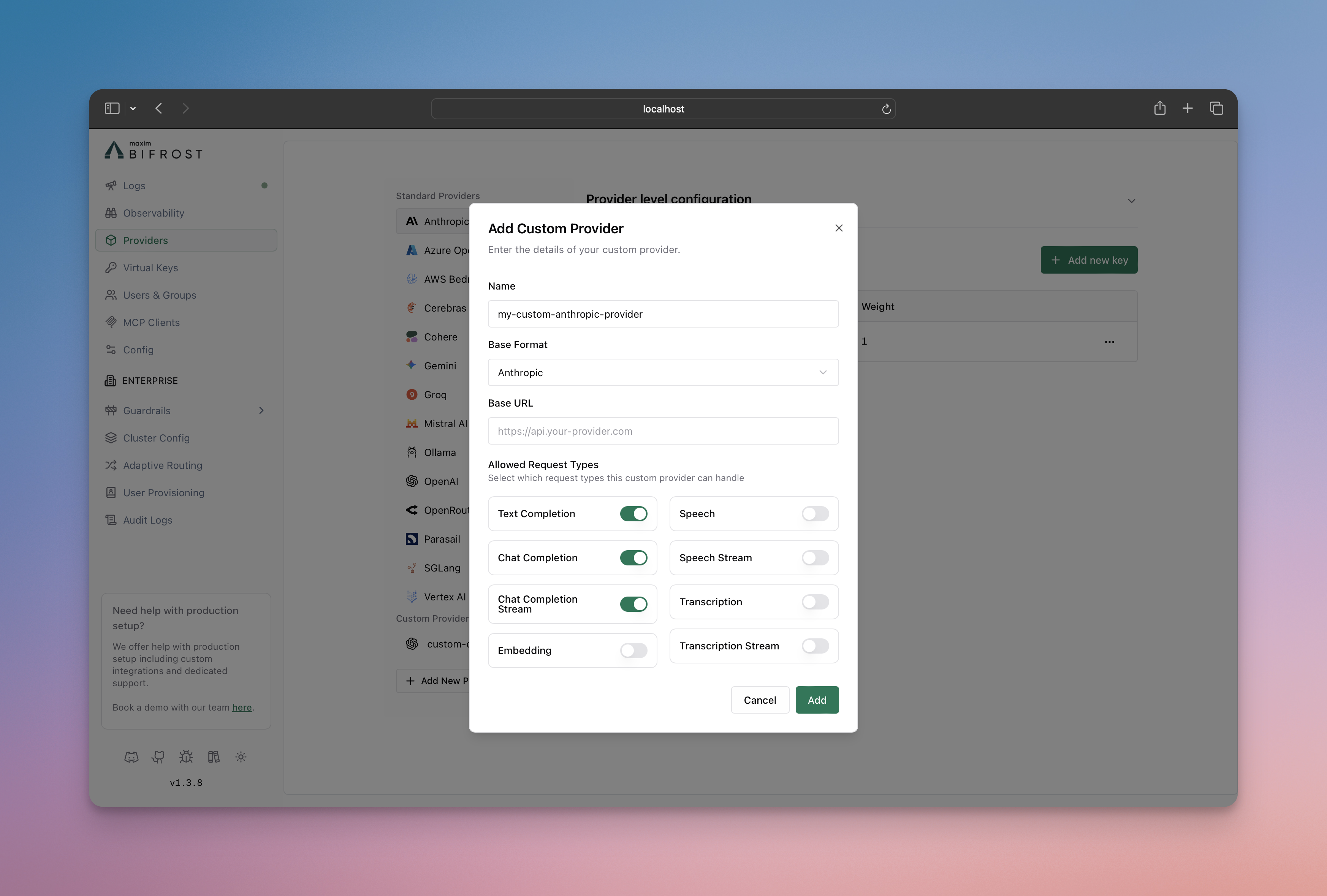
- Go to http://localhost:8080
- Navigate to “Providers” in the sidebar
- Click “Add New Provider”
- Choose a unique provider name (e.g., “openai-custom”)
- Select the base provider type (e.g., “openai”)
- Configure which request types are allowed
- Save configuration
# Create a chat-only custom providercurl --location 'http://localhost:8080/api/providers' \--header 'Content-Type: application/json' \--data '{ "provider": "openai-custom", "keys": [ { "name": "openai-custom-key-1", "value": "env.OPENAI_API_KEY", "models": [], "weight": 1.0 } ], "custom_provider_config": { "base_provider_type": "openai", "allowed_requests": { "list_models": false, "text_completion": false, "text_completion_stream": false, "chat_completion": true, "chat_completion_stream": true, "responses": false, "responses_stream": false, "embedding": false, "speech": false, "speech_stream": false, "transcription": false, "transcription_stream": false }, "request_path_overrides": { "chat_completion": "/v1/chat/completions" } }}'{ "providers": { "openai-custom": { "keys": [ { "name": "openai-custom-key-1", "value": "env.OPENAI_API_KEY", "models": [], "weight": 1.0 } ], "custom_provider_config": { "base_provider_type": "openai", "allowed_requests": { "list_models": false, "text_completion": false, "text_completion_stream": false, "chat_completion": true, "chat_completion_stream": true, "responses": false, "responses_stream": false, "embedding": false, "speech": false, "speech_stream": false, "transcription": false, "transcription_stream": false }, "request_path_overrides": { "chat_completion": "/v1/chat/completions" } } } }}Create a custom provider using the Go SDK by implementing the Account interface with custom provider configuration:
package main
import (    "context"    "fmt"    "os"    "time"
    "github.com/maximhq/deepintshield/core/schemas")
// Define custom provider nameconst ProviderOpenAICustom = schemas.ModelProvider("openai-custom")
type MyAccount struct{}
func (a *MyAccount) GetConfiguredProviders() ([]schemas.ModelProvider, error) {    return []schemas.ModelProvider{        schemas.OpenAI,        ProviderOpenAICustom, // Include your custom provider    }, nil}
func (a *MyAccount) GetKeysForProvider(ctx context.Context, provider schemas.ModelProvider) ([]schemas.Key, error) {    switch provider {    case schemas.OpenAI:        return []schemas.Key{{            Value:  os.Getenv("OPENAI_API_KEY"),            Models: []string{},            Weight: 1.0,        }}, nil    case ProviderOpenAICustom:        return []schemas.Key{{            Value:  os.Getenv("OPENAI_CUSTOM_API_KEY"), // API key for OpenAI-compatible endpoint            Models: []string{},            Weight: 1.0,        }}, nil    }    return nil, fmt.Errorf("provider %s not supported", provider)}
func (a *MyAccount) GetConfigForProvider(provider schemas.ModelProvider) (*schemas.ProviderConfig, error) {    switch provider {    case schemas.OpenAI:        return &schemas.ProviderConfig{            NetworkConfig:            schemas.DefaultNetworkConfig,            ConcurrencyAndBufferSize: schemas.DefaultConcurrencyAndBufferSize,        }, nil    case ProviderOpenAICustom:        return &schemas.ProviderConfig{            NetworkConfig: schemas.NetworkConfig{                BaseURL:                        "https://your-openai-compatible-endpoint.com", // Custom base URL                DefaultRequestTimeoutInSeconds: 60,                MaxRetries:                     1,                RetryBackoffInitial:            100 * time.Millisecond,                RetryBackoffMax:                2 * time.Second,            },            ConcurrencyAndBufferSize: schemas.ConcurrencyAndBufferSize{                Concurrency: 3,                BufferSize:  10,            },            CustomProviderConfig: &schemas.CustomProviderConfig{                BaseProviderType: schemas.OpenAI, // Use OpenAI protocol                AllowedRequests: &schemas.AllowedRequests{                    TextCompletion:       false,                    TextCompletionStream: false,                    ChatCompletion:       true,  // Enable chat completion                    ChatCompletionStream: true,  // Enable streaming                    Responses:            false,                    ResponsesStream:      false,                    Embedding:            false,                    Speech:               false,                    SpeechStream:         false,                    Transcription:        false,                    TranscriptionStream:  false,                },                RequestPathOverrides: map[schemas.RequestType]string{                    schemas.ChatCompletionRequest:       "/v1/chat/completions",                    schemas.ChatCompletionStreamRequest: "/v1/chat/completions",                },            },        }, nil    }    return nil, fmt.Errorf("provider %s not supported", provider)}
Configuration Options
Section titled “Configuration Options”Allowed Request Types
Section titled “Allowed Request Types”Control which operations your custom provider can perform. The behavior is:
- If
allowed_requestsis not specified: All operations are allowed by default - If
allowed_requestsis specified: Only the fields set totrueare allowed, all others default tofalse
Available operations:
text_completion: Legacy text completion requeststext_completion_stream: Streaming text completion requestschat_completion: Standard chat completion requestschat_completion_stream: Streaming chat responsesresponses: Standard responses requestsresponses_stream: Streaming responses requestsembedding: Text embedding generationspeech: Text-to-speech conversionspeech_stream: Streaming text-to-speechtranscription: Speech-to-text conversiontranscription_stream: Streaming speech-to-text
Base Provider Types
Section titled “Base Provider Types”Custom providers can be built on these supported providers:
openai- OpenAI APIanthropic- Anthropic Claudebedrock- AWS Bedrockcohere- Coheregemini- Geminireplicate- Replicate
Request Path Overrides
Section titled “Request Path Overrides”The request_path_overrides field allows you to override the default API endpoint paths for specific request types. This is useful when:
- Connecting to custom or self-hosted model providers
- Integrating with proxies that expect specific URL patterns
- Using provider forks with modified API paths
The field accepts a mapping of request types to either custom paths or full URLs:
Using Paths (relative to base_url):
{ "request_path_overrides": { "chat_completion": "/v1/chat/completions", "chat_completion_stream": "/v1/chat/completions", "embedding": "/v1/embeddings", "text_completion": "/v1/completions" }}Using Full URLs (bypasses base_url):
{ "request_path_overrides": { "chat_completion": "https://specific-endpoint.com/chat", "embedding": "http://another-service:8080/embeddings" }}Example: OpenAI-Compatible Endpoint with Custom Paths
{ "custom-llm": { "keys": [{ "name": "custom-llm-key-1", "value": "env.PROVIDER_API_KEY", "models": [], "weight": 1.0 }], "network_config": { "base_url": "https://your-openai-compatible-endpoint.com" }, "custom_provider_config": { "base_provider_type": "openai", "allowed_requests": { "chat_completion": true, "chat_completion_stream": true }, "request_path_overrides": { "chat_completion": "/api/v2/chat", "chat_completion_stream": "/api/v2/chat" } } }}In this example, instead of using OpenAI’s default /v1/chat/completions path, requests will be sent to https://custom-endpoint.example.com/api/v2/chat.
TLS for Self-Signed or Internal Certificates
Section titled “TLS for Self-Signed or Internal Certificates”When connecting to providers with HTTPS endpoints that use self-signed certificates or internal CAs (e.g., air-gapped environments, internal services), you can configure TLS in network_config:
| Field | Type | Description |
|---|---|---|
insecure_skip_verify | boolean | Disable TLS certificate verification. Use only for trusted internal environments. Not recommended for production. |
ca_cert_pem | string | PEM-encoded CA certificate to trust for provider connections. Use when the endpoint uses a custom CA. |
These options are mutually exclusive. Do not set insecure_skip_verify: true together with ca_cert_pem; provider config validation rejects that combination.
Option 1: Skip verification (air-gapped / self-signed)
{ "my-air-gapped-provider": { "keys": [{ "name": "key-1", "value": "env.API_KEY", "models": [], "weight": 1.0 }], "network_config": { "base_url": "https://internal-llm.example.com", "insecure_skip_verify": true }, "custom_provider_config": { "base_provider_type": "openai", "allowed_requests": { "chat_completion": true, "chat_completion_stream": true } } }}Option 2: Custom CA certificate (preferred when you have the CA)
{ "my-internal-provider": { "keys": [{ "name": "key-1", "value": "env.API_KEY", "models": [], "weight": 1.0 }], "network_config": { "base_url": "https://internal-llm.example.com", "ca_cert_pem": "-----BEGIN CERTIFICATE-----\n...\n-----END CERTIFICATE-----" }, "custom_provider_config": { "base_provider_type": "openai", "allowed_requests": { "chat_completion": true, "chat_completion_stream": true } } }}Use Cases
Section titled “Use Cases”1. Environment-Specific Configurations
Section titled “1. Environment-Specific Configurations”Create different configurations for production, staging, and development environments:
{ "openai-production": { "keys": [{ "name": "openai-prod-key-1", "value": "env.PROVIDER_API_KEY", "models": [], "weight": 1.0 }], "custom_provider_config": { "base_provider_type": "openai", "allowed_requests": { "chat_completion": true, "chat_completion_stream": true, "embedding": true, "speech": true, "speech_stream": true } } }, "openai-staging": { "keys": [{ "name": "openai-stage-key-1", "value": "env.PROVIDER_API_KEY", "models": [], "weight": 1.0 }], "custom_provider_config": { "base_provider_type": "openai", "allowed_requests": { "chat_completion": true, "chat_completion_stream": true, "embedding": true, "speech": false, "speech_stream": false } } }, "openai-dev": { "keys": [{ "name": "openai-dev-key-1", "value": "env.PROVIDER_API_KEY", "models": [], "weight": 1.0 }], "custom_provider_config": { "base_provider_type": "openai", "allowed_requests": { "chat_completion": true, "chat_completion_stream": false, "embedding": false, "speech": false, "speech_stream": false } } }}2. Role-Based Access Control
Section titled “2. Role-Based Access Control”Restrict capabilities based on user roles or team permissions. You can then create virtual keys for better management of who can access which providers, providing granular control over team permissions and resource usage. This integrates seamlessly with DeepIntShield’s governance features for comprehensive access control and monitoring:
{ "openai-developers": { "keys": [{ "name": "openai-developers-key-1", "value": "env.PROVIDER_API_KEY", "models": [], "weight": 1.0 }], "custom_provider_config": { "base_provider_type": "openai", "allowed_requests": { "chat_completion": true, "chat_completion_stream": true, "embedding": true, "text_completion": true } } }, "openai-analysts": { "keys": [{ "name": "openai-analysts-key-1", "value": "env.PROVIDER_API_KEY", "models": [], "weight": 1.0 }], "custom_provider_config": { "base_provider_type": "openai", "allowed_requests": { "chat_completion": true, "embedding": true } } }, "openai-support": { "keys": [{ "name": "openai-support-key-1", "value": "env.PROVIDER_API_KEY", "models": [], "weight": 1.0 }], "custom_provider_config": { "base_provider_type": "openai", "allowed_requests": { "chat_completion": true, "chat_completion_stream": false } } }}3. Feature Testing and Rollouts
Section titled “3. Feature Testing and Rollouts”Test new features with limited user groups:
{ "openai-beta-streaming": { "keys": [{ "name": "openai-streaming-key-1", "value": "env.PROVIDER_API_KEY", "models": [], "weight": 1.0 }], "custom_provider_config": { "base_provider_type": "openai", "allowed_requests": { "chat_completion": true, "chat_completion_stream": true, "embedding": false } } }, "openai-stable": { "keys": [{ "name": "openai-stable-key-1", "value": "env.PROVIDER_API_KEY", "models": [], "weight": 1.0 }], "custom_provider_config": { "base_provider_type": "openai", "allowed_requests": { "chat_completion": true, "chat_completion_stream": false, "embedding": true } } }}Making Requests
Section titled “Making Requests”Use your custom provider name in requests:
# Request to custom providercurl --location 'http://localhost:8080/v1/chat/completions' \--header 'Content-Type: application/json' \--data '{ "model": "openai-custom/gpt-4o-mini", "messages": [ {"role": "user", "content": "Hello!"} ]}'Relationship to Provider Configuration
Section titled “Relationship to Provider Configuration”Custom providers extend the standard provider configuration system. They inherit all the capabilities of their base provider while adding request type restrictions.
Learn more about provider configuration:
Next Steps
Section titled “Next Steps”- Fallbacks - Automatic failover between providers
- Load Balancing - Intelligent API key management with weighted load balancing
- Governance - Advanced access control and monitoring