
Tool Execution
Learn how to execute tools from connected MCP servers
DeepIntShield can connect to any MCP-compatible server to discover and execute tools. Each connection is called an MCP Client in DeepIntShield terminology.
DeepIntShield supports three connection protocols, each with different authentication options:
| Type | Description | Best For | Auth Support |
|---|---|---|---|
| STDIO | Spawns a subprocess and communicates via stdin/stdout | Local tools, CLI utilities, scripts | None |
| HTTP | Sends requests to an HTTP endpoint | Remote APIs, microservices, cloud functions | Headers, OAuth 2.0 |
| SSE | Server-Sent Events for persistent connections | Real-time data, streaming tools | Headers, OAuth 2.0 |
STDIO connections launch external processes and communicate via standard input/output. Best for local tools and scripts.
{ "name": "filesystem", "connection_type": "stdio", "stdio_config": { "command": "npx", "args": ["-y", "@anthropic/mcp-filesystem"], "envs": ["HOME", "PATH"] }, "tools_to_execute": ["*"]}Use Cases:
HTTP connections communicate with MCP servers via HTTP requests. Ideal for remote services and microservices.
HTTP connections support two authentication methods:
Use static headers for API keys and custom authentication tokens:
{ "name": "web-search", "connection_type": "http", "connection_string": "https://mcp-server.example.com/mcp", "auth_type": "headers", "headers": { "Authorization": "Bearer your-api-key", "X-Custom-Header": "value" }, "tools_to_execute": ["*"]}Use Cases:
Use OAuth 2.0 for secure, user-based authentication with automatic token refresh:
{ "name": "web-search", "connection_type": "http", "connection_string": "https://mcp-server.example.com/mcp", "auth_type": "oauth", "oauth_config": { "client_id": "your-client-id", "client_secret": "your-client-secret", "authorize_url": "https://auth.example.com/authorize", "token_url": "https://auth.example.com/token", "scopes": ["read", "write"] }, "tools_to_execute": ["*"]}Features:
→ Learn more about OAuth authentication →
Use Cases:
Overall HTTP Use Cases:
Server-Sent Events (SSE) connections provide real-time, persistent connections to MCP servers. Like HTTP connections, SSE supports both header-based and OAuth authentication.
{ "name": "live-data", "connection_type": "sse", "connection_string": "https://stream.example.com/mcp/sse", "auth_type": "headers", "headers": { "Authorization": "Bearer your-api-key" }, "tools_to_execute": ["*"]}{ "name": "live-data", "connection_type": "sse", "connection_string": "https://stream.example.com/mcp/sse", "auth_type": "oauth", "oauth_config": { "client_id": "your-client-id", "authorize_url": "https://auth.example.com/authorize", "token_url": "https://auth.example.com/token", "scopes": ["stream:read"] }, "tools_to_execute": ["*"]}Use Cases:
→ Learn more about OAuth authentication →
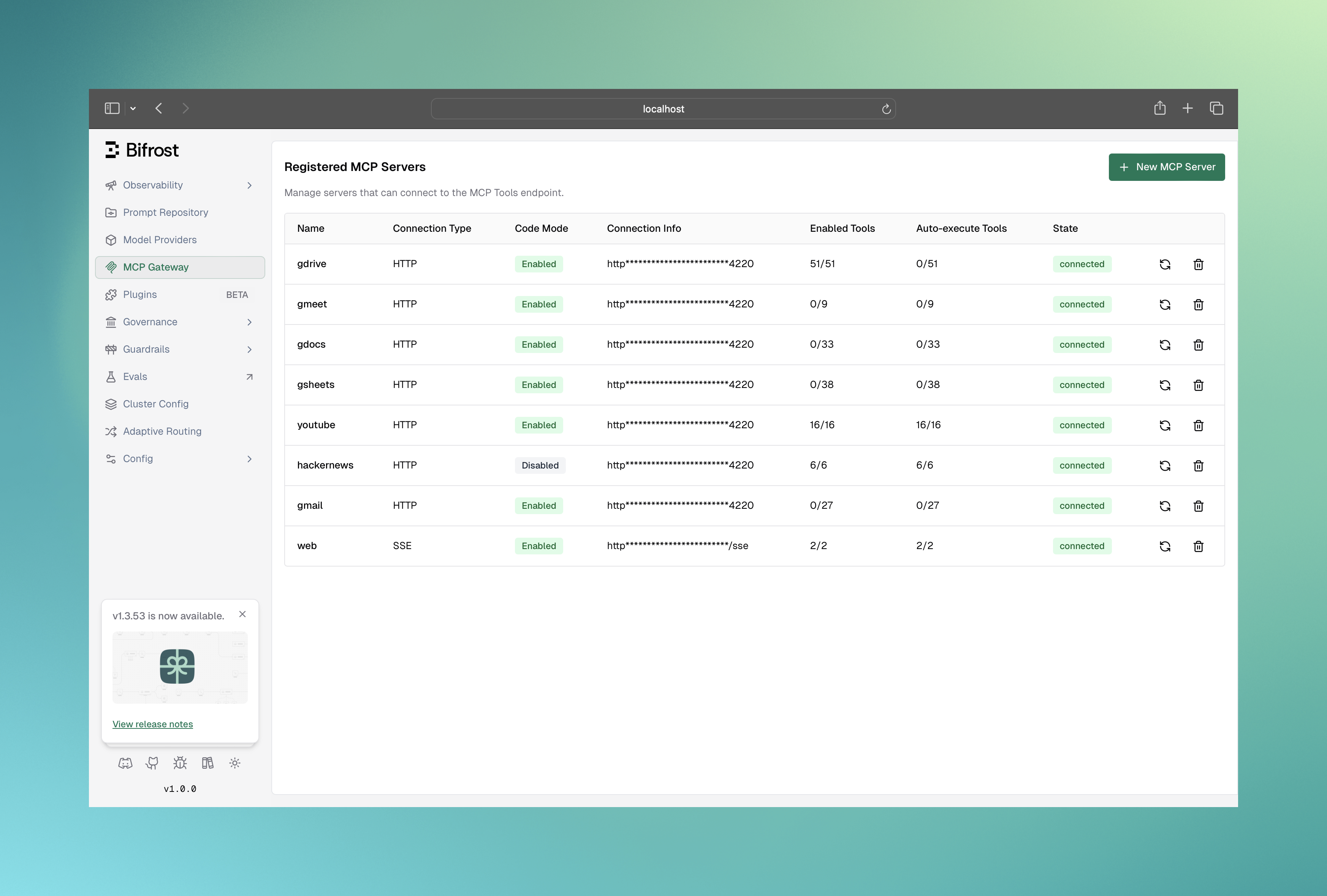
Click New MCP Server button to open the creation form
Fill in the connection details:
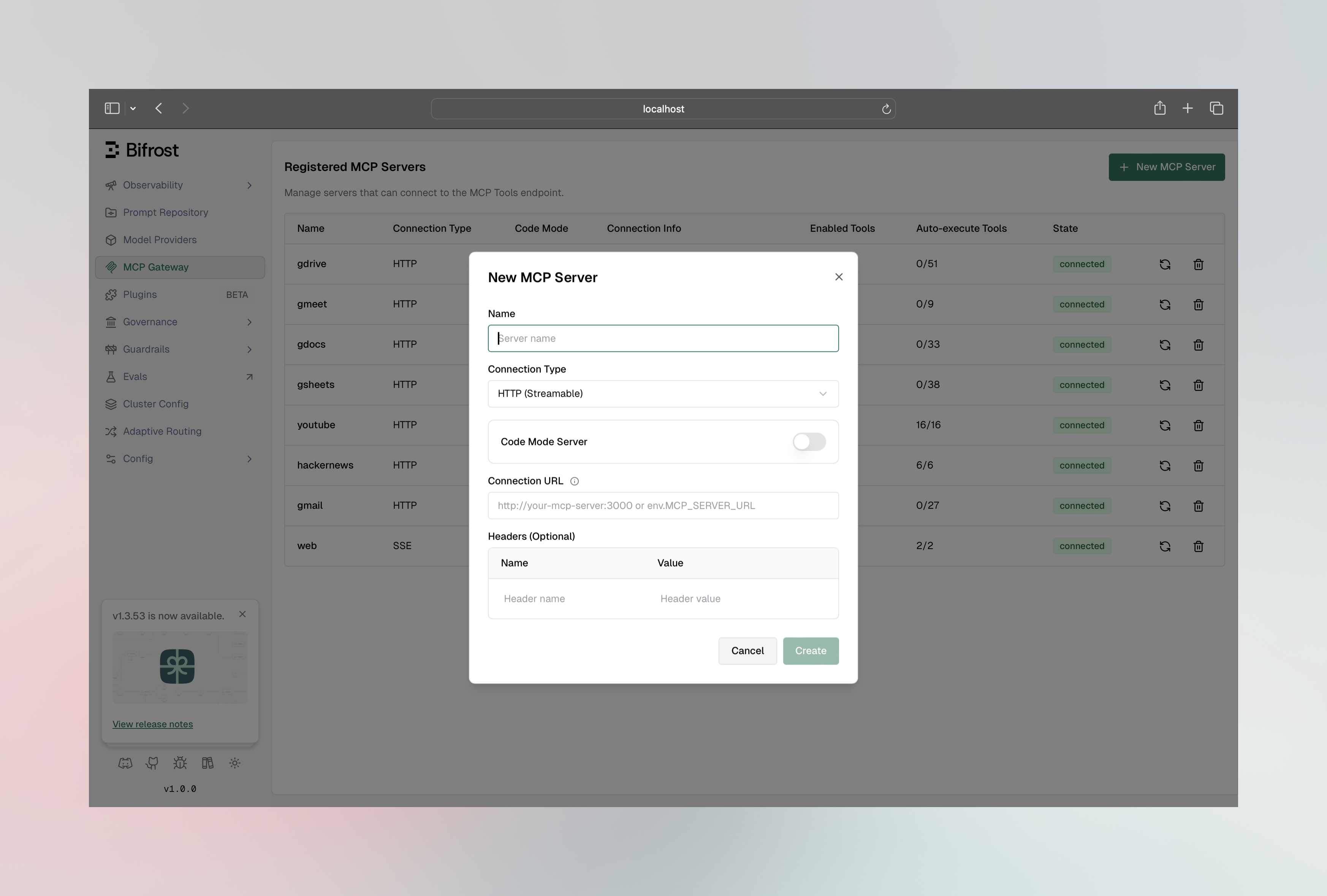
Fields:
Once connected, click on any client row to open the configuration sheet:
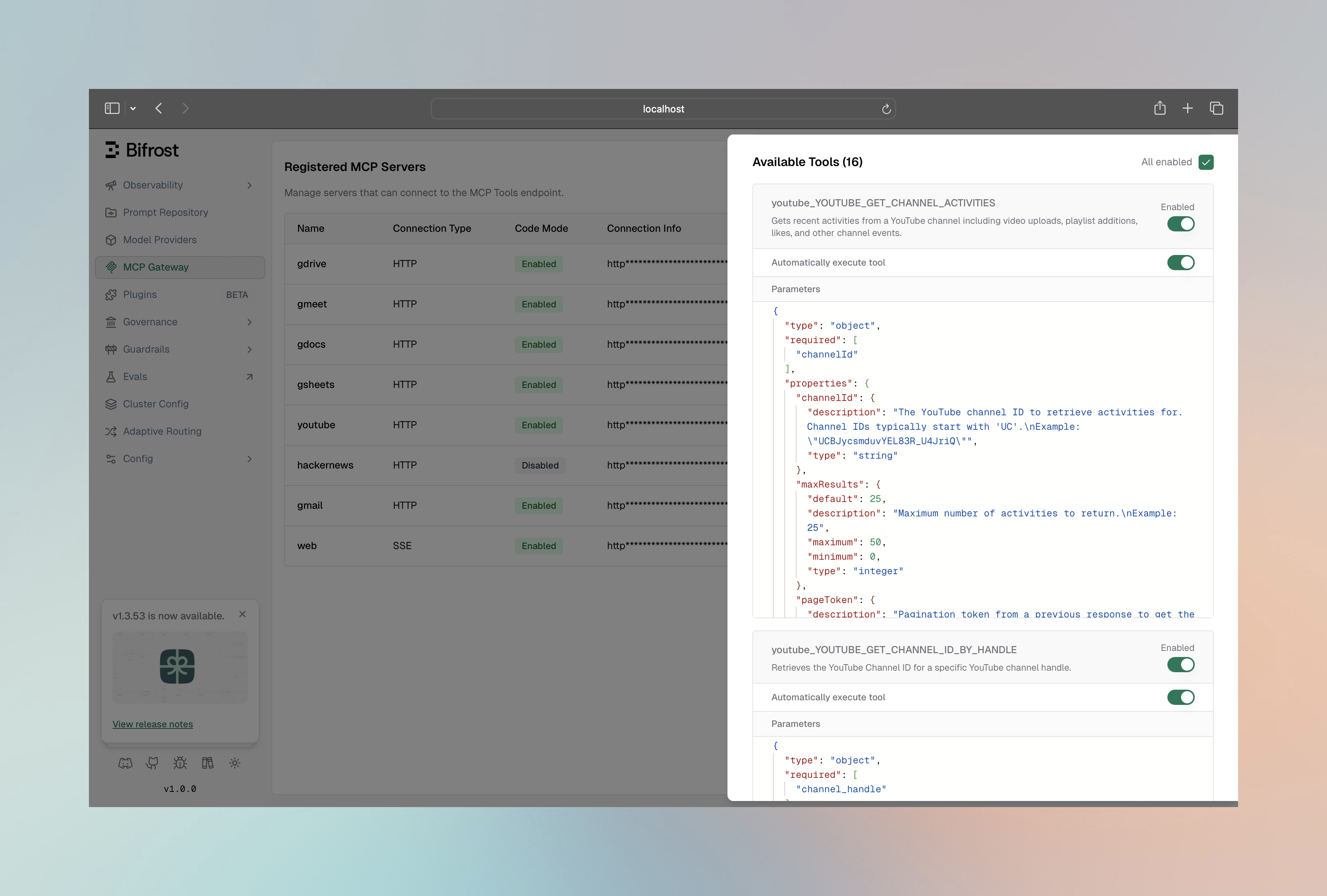
Here you can:
curl -X POST http://localhost:8080/api/mcp/client \ -H "Content-Type: application/json" \ -d '{ "name": "filesystem", "connection_type": "stdio", "stdio_config": { "command": "npx", "args": ["-y", "@anthropic/mcp-filesystem"], "envs": ["HOME", "PATH"] }, "tools_to_execute": ["*"] }'curl -X POST http://localhost:8080/api/mcp/client \ -H "Content-Type: application/json" \ -d '{ "name": "web_search", "connection_type": "http", "connection_string": "http://localhost:3001/mcp", "tools_to_execute": ["*"] }'curl -X POST http://localhost:8080/api/mcp/client \ -H "Content-Type: application/json" \ -d '{ "name": "realtime_data", "connection_type": "sse", "connection_string": "https://api.example.com/mcp/sse", "tools_to_execute": ["*"] }'curl http://localhost:8080/api/mcp/clientsResponse:
[ { "config": { "id": "abc123", "name": "filesystem", "connection_type": "stdio", "stdio_config": { "command": "npx", "args": ["-y", "@anthropic/mcp-filesystem"] } }, "tools": [ {"name": "read_file", "description": "Read contents of a file"}, {"name": "write_file", "description": "Write contents to a file"}, {"name": "list_directory", "description": "List directory contents"} ], "state": "connected" }]Configure MCP clients in your config.json:
{ "mcp": { "client_configs": [ { "name": "filesystem", "connection_type": "stdio", "is_ping_available": true, "stdio_config": { "command": "npx", "args": ["-y", "@anthropic/mcp-filesystem"], "envs": ["HOME", "PATH"] }, "tools_to_execute": ["*"] }, { "name": "web_search", "connection_type": "http", "connection_string": "env.WEB_SEARCH_MCP_URL", "is_ping_available": false, "tools_to_execute": ["search", "fetch_url"] }, { "name": "database", "connection_type": "sse", "connection_string": "https://db-mcp.example.com/sse", "is_ping_available": true, "tools_to_execute": [] } ] }}Configure MCP in your DeepIntShield initialization:
package main
import (    "context"    deepintshield "github.com/maximhq/deepintshield/core"    "github.com/maximhq/deepintshield/core/schemas")
func main() {    mcpConfig := &schemas.MCPConfig{        ClientConfigs: []schemas.MCPClientConfig{            {                Name:             "filesystem",                ConnectionType:   schemas.MCPConnectionTypeSTDIO,                IsPingAvailable:  true,  // Use lightweight ping for health checks                StdioConfig: &schemas.MCPStdioConfig{                    Command: "npx",                    Args:    []string{"-y", "@anthropic/mcp-filesystem"},                    Envs:    []string{"HOME", "PATH"},                },                ToolsToExecute: []string{"*"},            },            {                Name:             "web_search",                ConnectionType:   schemas.MCPConnectionTypeHTTP,                ConnectionString: deepintshield.Ptr("http://localhost:3001/mcp"),                IsPingAvailable:  false,  // Use listTools for health checks                ToolsToExecute:   []string{"search", "fetch_url"},            },        },    }
client, err := deepintshield.Init(context.Background(), schemas.DeepIntShieldConfig{ Account: account, MCPConfig: mcpConfig, Logger: deepintshield.NewDefaultLogger(schemas.LogLevelInfo), }) if err != nil { panic(err) }}The ToolsToExecute field controls which tools from the client are available:
| Value | Behavior |
|---|---|
["*"] | All tools from this client are included |
[] or nil | No tools included (deny-by-default) |
["tool1", "tool2"] | Only specified tools are included |
The ToolsToAutoExecute field controls which tools can be automatically executed in Agent Mode:
| Value | Behavior |
|---|---|
["*"] | All tools are auto-executed |
[] or nil | No tools are auto-executed (manual approval required) |
["tool1", "tool2"] | Only specified tools are auto-executed |
Example configuration:
{ Name: "filesystem", ConnectionType: schemas.MCPConnectionTypeSTDIO, StdioConfig: &schemas.MCPStdioConfig{ Command: "npx", Args: []string{"-y", "@anthropic/mcp-filesystem"}, }, ToolsToExecute: []string{"*"}, // All tools available ToolsToAutoExecute: []string{"read_file", "list_directory"}, // Only these auto-execute}Use environment variables for sensitive configuration values:
Gateway (config.json):
{ "name": "secure_api", "connection_type": "http", "connection_string": "env.SECURE_MCP_URL"}Go SDK:
{ Name: "secure_api", ConnectionType: schemas.MCPConnectionTypeHTTP, ConnectionString: deepintshield.Ptr(os.Getenv("SECURE_MCP_URL")),}Environment variables are:
| State | Description |
|---|---|
connected | Client is active and tools are available |
connecting | Client is establishing connection |
disconnected | Client lost connection but can be reconnected |
error | Client configuration or connection failed |
Reconnect a client:
curl -X POST http://localhost:8080/api/mcp/client/{id}/reconnectEdit client configuration:
curl -X PUT http://localhost:8080/api/mcp/client/{id} \ -H "Content-Type: application/json" \ -d '{ "name": "filesystem", "connection_type": "stdio", "stdio_config": { "command": "npx", "args": ["-y", "@anthropic/mcp-filesystem"] }, "tools_to_execute": ["read_file", "list_directory"] }'Remove a client:
curl -X DELETE http://localhost:8080/api/mcp/client/{id}// Get all connected clientsclients, err := client.GetMCPClients()for _, mcpClient := range clients { fmt.Printf("Client: %s, State: %s, Tools: %d\n", mcpClient.Config.Name, mcpClient.State, len(mcpClient.Tools))}
// Reconnect a disconnected clienterr = client.ReconnectMCPClient("filesystem")
// Add new client at runtimeerr = client.AddMCPClient(schemas.MCPClientConfig{ Name: "new_client", ConnectionType: schemas.MCPConnectionTypeHTTP, ConnectionString: deepintshield.Ptr("http://localhost:3002/mcp"), ToolsToExecute: []string{"*"},})
// Remove a clienterr = client.RemoveMCPClient("old_client")
// Edit client toolserr = client.EditMCPClientTools("filesystem", []string{"read_file", "list_directory"})DeepIntShield automatically monitors MCP client health with periodic checks every 10 seconds by default.
By default, DeepIntShield uses the lightweight ping method for health checks. However, you can configure the health check method based on your MCP server’s capabilities:
| Method | When to Use | Overhead | Fallback |
|---|---|---|---|
| Ping (default) | Server supports MCP ping protocol | Minimal | Best for most servers |
| ListTools | Server doesn’t support ping, or you need heavier checks | Higher | More resource-intensive |
You can toggle the is_ping_available setting for each client:
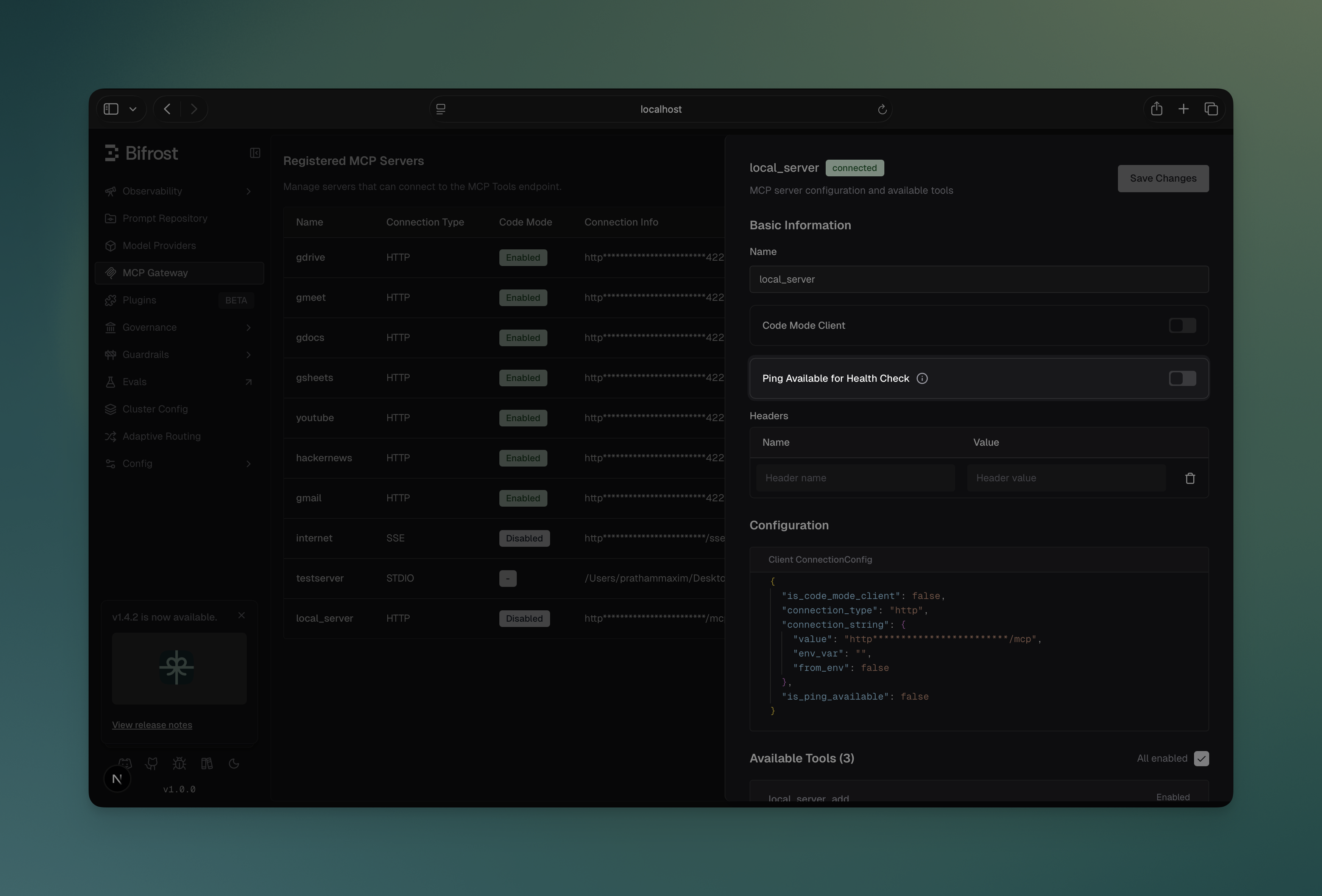
curl -X PUT http://localhost:8080/api/mcp/client/{id} \ -H "Content-Type: application/json" \ -d '{ "name": "my_server", "is_ping_available": false }'{ "mcp": { "client_configs": [ { "name": "filesystem", "connection_type": "stdio", "is_ping_available": true, "stdio_config": { "command": "npx", "args": ["-y", "@anthropic/mcp-filesystem"] } } ] }}err := client.EditMCPClient(context.Background(), schemas.MCPClientConfig{ ID: "filesystem", Name: "filesystem", IsPingAvailable: false, // Use listTools instead of ping ToolsToExecute: []string{"*"},})When a client disconnects:
disconnectedNote: Changing is_ping_available takes effect immediately without requiring a client reconnection.
DeepIntShield automatically implements exponential backoff retry logic to handle transient network failures and temporary service unavailability. This ensures that brief connection issues don’t immediately cause tool unavailability.
DeepIntShield retries failed operations using the following strategy, as implemented by ExecuteWithRetry and DefaultRetryConfig in the MCP layer:
| Parameter | Value | Description |
|---|---|---|
Max Retries (DefaultRetryConfig.MaxRetries) | 5 | Retries after the initial attempt (6 attempts total) |
Initial Backoff (DefaultRetryConfig.InitialBackoff) | 1 second | Starting backoff duration before doubling |
Max Backoff (DefaultRetryConfig.MaxBackoff) | 30 seconds | Maximum wait time between retries |
| Backoff Multiplier | 2x | Exponential growth between attempts |
Backoff Progression (matches ExecuteWithRetry with DefaultRetryConfig):
DeepIntShield intelligently classifies errors as either transient (retryable) or permanent (fail immediately):
Transient Errors (Retried):
Permanent Errors (Fail Immediately - No Retry):
DeepIntShield applies retry logic to these critical operations:
When a client reaches 5 consecutive health check failures:
disconnectedThis automatic reconnection happens asynchronously and doesn’t block other operations.
You can also trigger manual reconnection at any time:
curl -X POST http://localhost:8080/api/mcp/client/{id}/reconnectManual reconnection also uses the retry logic for robustness.
// Reconnect with automatic retry logicerr := client.ReconnectMCPClient("filesystem")if err != nil { log.Printf("Reconnection failed after retries: %v", err)}MCP client names have specific requirements:
Valid names: filesystem, web_search, myAPI, tool123
Invalid names: my-tools, web search, 123tools, datos-api