
Agent Mode
Combine Code Mode with auto-execution
Code Mode is a transformative approach to using MCP that solves a critical problem at scale:
The Problem: When you connect 8-10 MCP servers (150+ tools), every single request includes all tool definitions in the context. The LLM spends most of its budget reading tool catalogs instead of doing actual work.
The Solution: Instead of exposing 150 tools directly, Code Mode exposes just four generic tools. The LLM uses those tools to write Python code (Starlark) that orchestrates everything else in a sandbox.
Compare a workflow across 5 MCP servers with ~100 tools:
Classic MCP Flow:
Code Mode Flow:
Result: ~50% cost reduction + 30-40% faster execution
Code Mode provides four meta-tools to the AI:
listToolFiles - Discover available MCP serversreadToolFile - Load Python stub signatures on-demandgetToolDocs - Get detailed documentation for a specific toolexecuteToolCode - Execute Python code with full tool bindingsEnable Code Mode if you have:
Keep Classic MCP if you have:
You can mix both: Enable Code Mode for “heavy” servers (web, documents, databases) and keep small utilities as direct tools.
Instead of seeing 150+ tool definitions, the model sees four generic tools:
graph LR    LLM["<b>LLM Context</b><br/><i>Compact & Efficient</i>"]
    List["<b>listToolFiles</b><br/>Discover servers"]    Read["<b>readToolFile</b><br/>Load signatures"]    Docs["<b>getToolDocs</b><br/>Get detailed docs"]    Execute["<b>executeToolCode</b><br/>Run code with bindings"]
    Hidden["<i>All other MCP servers<br/>hidden behind these 4 tools</i>"]
    LLM --> List    LLM --> Read    LLM --> Docs    LLM --> Execute
    List -.-> Hidden    Read -.-> Hidden    Docs -.-> Hidden    Execute -.-> Hidden
style LLM fill:#E3F2FD,stroke:#0D47A1,stroke-width:2.5px,color:#1A1A1A style List fill:#E8F5E9,stroke:#1B5E20,stroke-width:2.5px,color:#1A1A1A style Read fill:#FFF3E0,stroke:#BF360C,stroke-width:2.5px,color:#1A1A1A style Docs fill:#E1F5FE,stroke:#0288D1,stroke-width:2.5px,color:#1A1A1A style Execute fill:#F3E5F5,stroke:#4A148C,stroke-width:2.5px,color:#1A1A1A style Hidden fill:#EEEEEE,stroke:#424242,stroke-width:1.5px,stroke-dasharray: 5 5,color:#1A1A1Agraph LR User["<b>1. User Request</b><br/>Search YouTube<br/>& save to file"]
Discover["<b>2. Discover Tools</b><br/>listToolFiles()"]
GetDefs["<b>3. Load Definitions</b><br/>readToolFile()"]
Write["<b>4. Write Code</b><br/>Python<br/>in sandbox"]
Execute["<b>5. Execute</b><br/>Real MCP calls<br/>contained in VM"]
Result["<b>6. Compact Result</b><br/>{saved:10}"]
Response["<b>7. Final Response</b><br/>Found & saved<br/>10 videos"]
User --> Discover Discover --> GetDefs GetDefs --> Write Write --> Execute Execute --> Result Result --> Response
style User fill:#E3F2FD,stroke:#0D47A1,stroke-width:2.5px,color:#1A1A1A style Discover fill:#F3E5F5,stroke:#4A148C,stroke-width:2.5px,color:#1A1A1A style GetDefs fill:#F3E5F5,stroke:#4A148C,stroke-width:2.5px,color:#1A1A1A style Write fill:#FFF3E0,stroke:#BF360C,stroke-width:2.5px,color:#1A1A1A style Execute fill:#E8F5E9,stroke:#1B5E20,stroke-width:3px,color:#1A1A1A style Result fill:#FFFDE7,stroke:#F57F17,stroke-width:2.5px,color:#1A1A1A style Response fill:#E8F5E9,stroke:#1B5E20,stroke-width:2.5px,color:#1A1A1AKey insight: All the complex orchestration happens inside the sandbox. The LLM only receives the final, compact result—not every intermediate step.
Turn 1: Prompt + search query + [100 tool definitions]Turn 2: Prompt + search result + [100 tool definitions]Turn 3: Prompt + channel list + [100 tool definitions]Turn 4: Prompt + video list + [100 tool definitions]Turn 5: Prompt + summaries + [100 tool definitions]Turn 6: Prompt + doc result + [100 tool definitions]
Total: 6 LLM calls, ~600+ tokens in tool definitions aloneTurn 1: Prompt + 4 tools (listToolFiles, readToolFile, getToolDocs, executeToolCode)Turn 2: Prompt + server list + 4 toolsTurn 3: Prompt + selected definitions + 4 tools + [EXECUTES CODE] [YouTube search, channel list, videos, summaries, doc creation all happen in sandbox]Turn 4: Prompt + final result + 4 tools
Total: 3-4 LLM calls, ~50 tokens in tool definitionsResult: 50% cost reduction, 3-4x fewer LLM round tripsCode Mode must be enabled per MCP client. Once enabled, that client’s tools are accessed through the four meta-tools rather than exposed directly.
Best practice: Enable Code Mode for 3+ servers or any “heavy” server (web search, documents, databases).
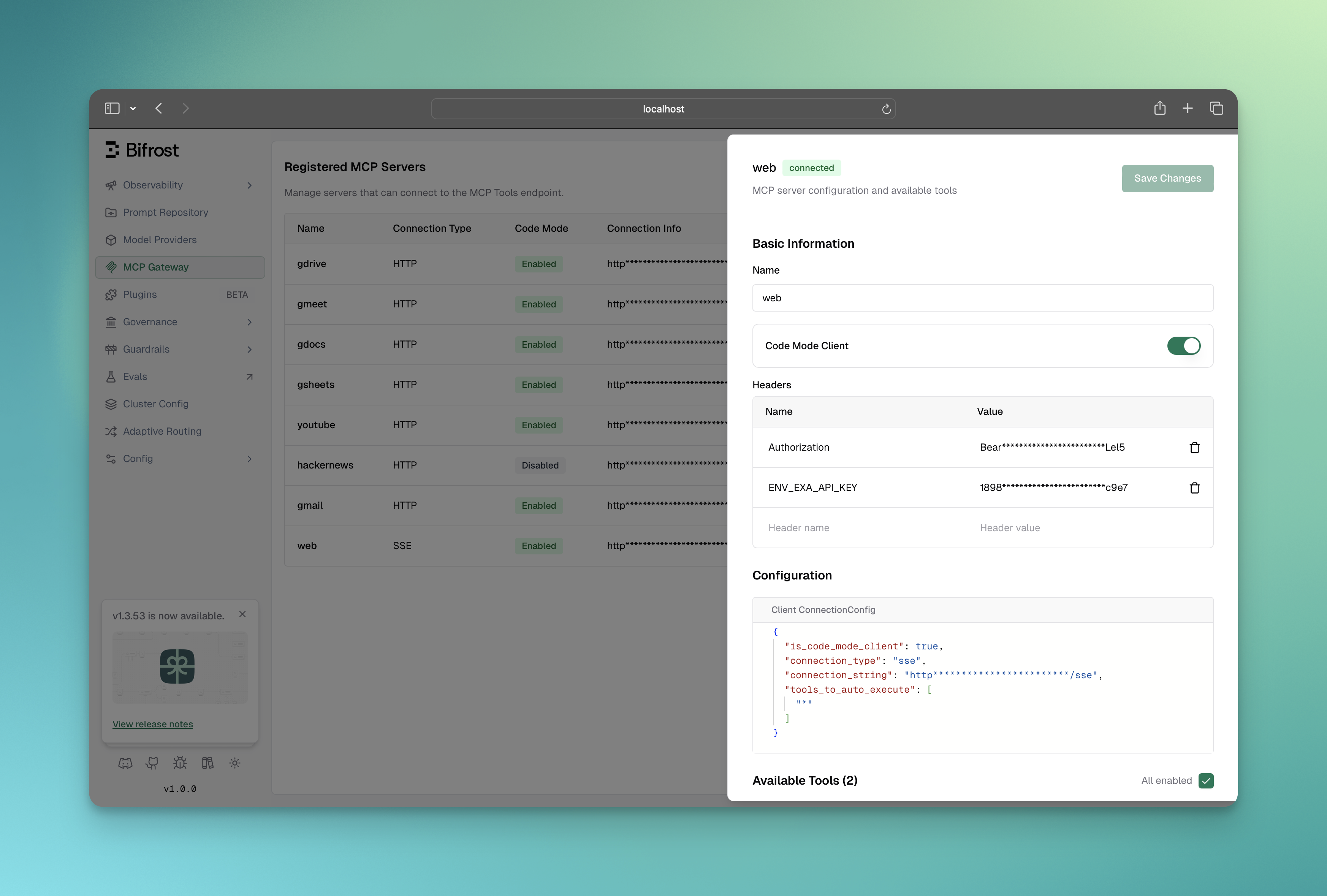
Once enabled:
listToolFiles() and readToolFile()executeToolCode() to call them# When adding a new clientcurl -X POST http://localhost:8080/api/mcp/client \ -H "Content-Type: application/json" \ -d '{ "name": "youtube", "connection_type": "http", "connection_string": "http://localhost:3001/mcp", "tools_to_execute": ["*"], "is_code_mode_client": true }'
# Or update an existing clientcurl -X PUT http://localhost:8080/api/mcp/client/{id} \ -H "Content-Type: application/json" \ -d '{ "name": "youtube", "connection_type": "http", "connection_string": "http://localhost:3001/mcp", "tools_to_execute": ["*"], "is_code_mode_client": true }'{ "mcp": { "client_configs": [ { "name": "youtube", "connection_type": "http", "connection_string": "http://localhost:3001/mcp", "tools_to_execute": ["*"], "is_code_mode_client": true }, { "name": "filesystem", "connection_type": "stdio", "stdio_config": { "command": "npx", "args": ["-y", "@anthropic/mcp-filesystem"] }, "tools_to_execute": ["*"], "is_code_mode_client": true } ] }}mcpConfig := &schemas.MCPConfig{ ClientConfigs: []schemas.MCPClientConfig{ { Name: "youtube", ConnectionType: schemas.MCPConnectionTypeHTTP, ConnectionString: deepintshield.Ptr("http://localhost:3001/mcp"), ToolsToExecute: []string{"*"}, IsCodeModeClient: true, // Enable code mode }, { Name: "filesystem", ConnectionType: schemas.MCPConnectionTypeSTDIO, StdioConfig: &schemas.MCPStdioConfig{ Command: "npx", Args: []string{"-y", "@anthropic/mcp-filesystem"}, }, ToolsToExecute: []string{"*"}, IsCodeModeClient: true, // Enable code mode }, },}When Code Mode clients are connected, DeepIntShield automatically adds four meta-tools to every request:
Lists all available virtual .pyi stub files for connected code mode servers.
Example output (Server-level binding):
servers/ youtube.pyi filesystem.pyiExample output (Tool-level binding):
servers/ youtube/ search.pyi get_video.pyi filesystem/ read_file.pyi write_file.pyiReads a virtual .pyi file to get compact Python function signatures for tools.
Parameters:
fileName (required): Path like servers/youtube.pyi or servers/youtube/search.pyistartLine (optional): 1-based starting line for partial readsendLine (optional): 1-based ending line for partial readsExample output:
# youtube server tools# Usage: youtube.tool_name(param=value)# For detailed docs: use getToolDocs(server="youtube", tool="tool_name")
def search(query: str, maxResults: int = None) -> dict: # Search for videosdef get_video(id: str) -> dict: # Get video detailsGet detailed documentation for a specific tool when the compact signature from readToolFile is not sufficient.
Parameters:
server (required): The server name (e.g., "youtube")tool (required): The tool name (e.g., "search")Example output:
# ============================================================================# Documentation for youtube.search tool# ============================================================================## USAGE INSTRUCTIONS:# Call tools using: result = youtube.tool_name(param=value)# No async/await needed - calls are synchronous.## CRITICAL - HANDLING RESPONSES:# Tool responses are dicts. To avoid runtime errors:# 1. Use print(result) to inspect the response structure first# 2. Access dict values with brackets: result["key"] NOT result.key# 3. Use .get() for safe access: result.get("key", default)# ============================================================================
def search(query: str, maxResults: int = None) -> dict:    """    Search for videos on YouTube.
    Args:        query (str): Search query (required)        maxResults (int): Max results to return (optional)
    Returns:        dict: Response from the tool. Structure varies by tool.              Use print(result) to inspect the actual structure.
Example: result = youtube.search(query="...") print(result) # Always inspect response first! value = result.get("key", default) # Safe access """ ...Executes Python code in a sandboxed Starlark interpreter with access to all code mode server tools.
Parameters:
code (required): Python code to executeExecution Environment:
youtube, filesystem)print() for logging (output captured in logs)result variable to return a valueSyntax notes:
server.tool(param="value") NOT server.tool({"param": "value"})result["key"] NOT result.key[x for x in items if x["active"]]Example code:
# Search YouTube and return formatted resultsresults = youtube.search(query="AI news", maxResults=5)titles = [item["snippet"]["title"] for item in results["items"]]print("Found", len(titles), "videos")result = {"titles": titles, "count": len(titles)}Code Mode supports two binding levels that control how tools are organized in the virtual file system:
All tools from a server are grouped into a single .pyi file.
servers/ youtube.pyi ← Contains all youtube tools filesystem.pyi ← Contains all filesystem toolsBest for:
Each tool gets its own .pyi file.
servers/ youtube/ search.pyi get_video.pyi get_channel.pyi filesystem/ read_file.pyi write_file.pyi list_directory.pyiBest for:
Binding level is a global setting that controls how Code Mode’s virtual file system is organized. It affects how the AI discovers and loads tool definitions.
Binding level can be viewed in the MCP configuration overview:
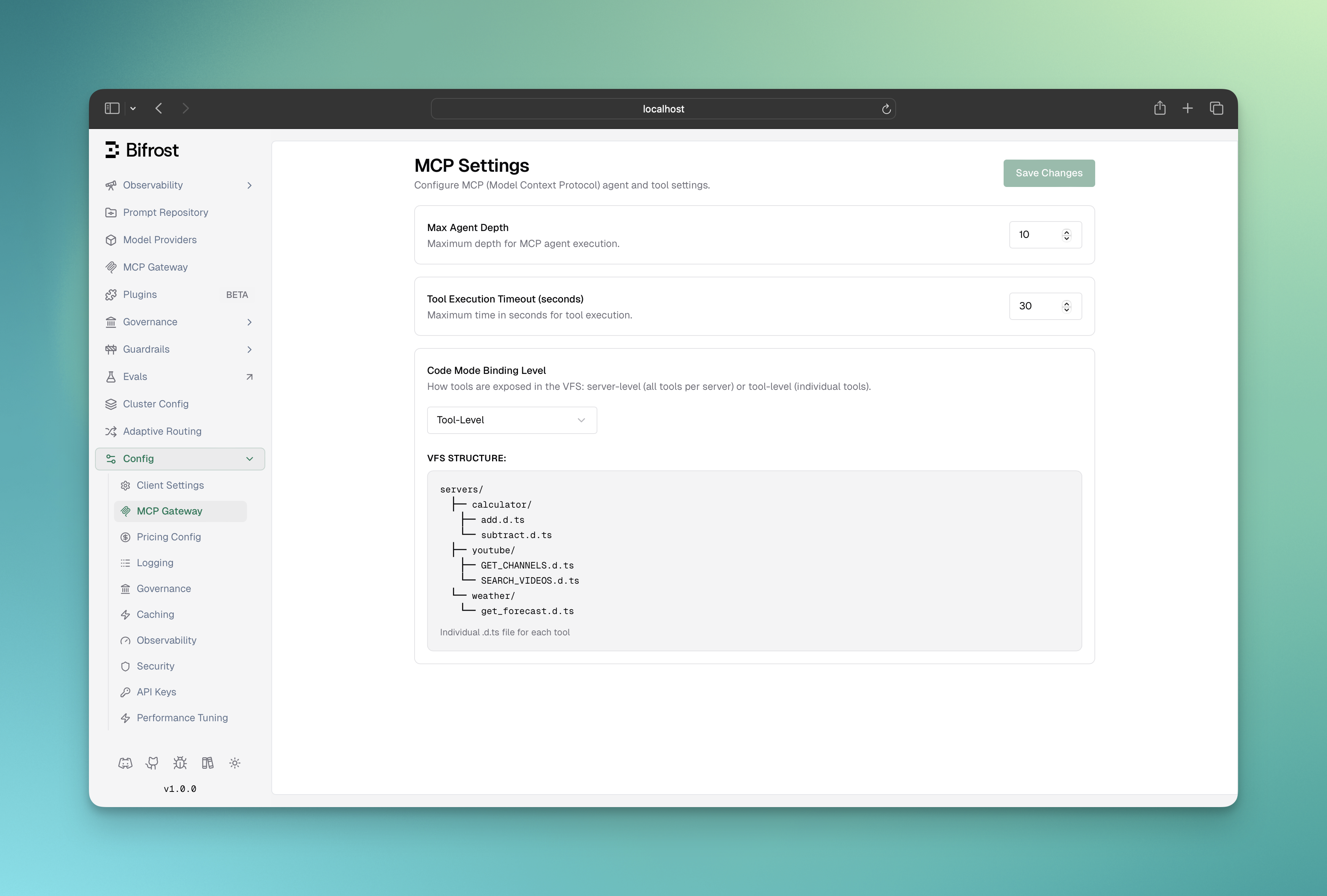
Server-level (default): One .pyi file per MCP server
servers/youtube.pyi contains all YouTube toolsTool-level: One .pyi file per individual tool
servers/youtube/search.pyi, servers/youtube/list_channels.pyiBoth modes use the same four-tool interface (listToolFiles, readToolFile, getToolDocs, executeToolCode). The choice is purely about context efficiency per read operation.
{ "mcp": { "tool_manager_config": { "code_mode_binding_level": "server" } }}Options: "server" (default) or "tool"
mcpConfig := &schemas.MCPConfig{ ToolManagerConfig: &schemas.MCPToolManagerConfig{ CodeModeBindingLevel: schemas.CodeModeBindingLevelTool, // or CodeModeBindingLevelServer }, ClientConfigs: []schemas.MCPClientConfig{ // ... clients },}Code Mode tools can be auto-executed in Agent Mode, but with additional validation:
listToolFiles and readToolFile tools are always auto-executable (they’re read-only)executeToolCode tool is auto-executable only if all tool calls within the code are allowedWhen executeToolCode is called in agent mode:
serverName.toolName() callstools_to_auto_execute for that serverExample:
{ "name": "youtube", "tools_to_execute": ["*"], "tools_to_auto_execute": ["search"], "is_code_mode_client": true}# This code WILL auto-execute (only uses search)results = youtube.search(query="AI")result = results
# This code will NOT auto-execute (uses delete_video which is not in auto-execute list)youtube.delete_video(id="abc123")| Available | Not Available |
|---|---|
| Python-like syntax | import statements |
| Synchronous tool calls | Classes (use dicts) |
print() for logging | File I/O |
| Dict/List operations | Network access |
| List comprehensions | random, time modules |
Engine: Starlark interpreter (Python subset)
Tool Exposure: Tools from code mode clients are exposed as global objects:
# If you have a 'youtube' code mode client with a 'search' toolresults = youtube.search(query="AI news")Code Processing:
Execution Limits:
DeepIntShield provides detailed error messages with hints:
# Error: youtube is not defined# Hints:# - Variable or identifier 'youtube' is not defined# - Available server keys: youtubeAPI, filesystem# - Use one of the available server keys as the object nametool_execution_timeout in tool_manager_configSetup:
| Metric | Value |
|---|---|
| LLM Turns | 8-10 |
| Tokens in Tool Defs | ~2,400 per turn |
| Avg Request Tokens | 4,000-5,000 |
| Avg Total Cost | $3.20-4.00 |
| Latency | 18-25 seconds |
Problem: Most context goes to tool definitions. Model makes redundant tool calls. Every intermediate result travels back through the LLM.
| Metric | Value |
|---|---|
| LLM Turns | 3-4 |
| Tokens in Tool Defs | ~100-300 per turn |
| Avg Request Tokens | 1,500-2,000 |
| Avg Total Cost | $1.20-1.80 |
| Latency | 8-12 seconds |
Benefit: Model writes one Python script. All orchestration happens in sandbox. Only compact result returned to LLM.