
Semantic Caching
Overview
Section titled “Overview”Semantic caching uses vector similarity search to intelligently cache AI responses, serving cached results for semantically similar requests even when the exact wording differs. This dramatically reduces API costs and latency for repeated or similar queries.
Key Benefits:
- Cost Reduction: Avoid expensive LLM API calls for similar requests
- Improved Performance: Sub-millisecond cache retrieval vs multi-second API calls
- Intelligent Matching: Semantic similarity beyond exact text matching
- Streaming Support: Full streaming response caching with proper chunk ordering
Core Features
Section titled “Core Features”- Dual-Layer Caching: Exact hash matching + semantic similarity search (customizable threshold)
- Vector-Powered Intelligence: Uses embeddings to find semantically similar requests
- Dynamic Configuration: Per-request TTL and threshold overrides via headers/context
- Model/Provider Isolation: Separate caching per model and provider combination
Vector Store Setup
Section titled “Vector Store Setup”Semantic caching requires a configured vector store. DeepIntShield supports the following vector databases:
- Weaviate: Production-ready vector database with gRPC support
- Redis: High-performance in-memory vector store using RediSearch-compatible APIs (including Valkey bundles with
FT.*support) - Qdrant: Rust-based vector search engine with advanced filtering
- Pinecone: Managed vector database service with serverless options
Quick Example (Weaviate):
import (    "context"    "github.com/maximhq/deepintshield/framework/vectorstore")
// Configure vector store (example: Weaviate)vectorConfig := &vectorstore.Config{    Enabled: true,    Type:    vectorstore.VectorStoreTypeWeaviate,    Config: vectorstore.WeaviateConfig{        Scheme: "http",        Host:   "localhost:8080",    },}
// Create vector storestore, err := vectorstore.NewVectorStore(context.Background(), vectorConfig, logger)if err != nil {    log.Fatal("Failed to create vector store:", err)}
{ "vector_store": { "enabled": true, "type": "weaviate", "config": { "host": "localhost:8080", "scheme": "http" } }}Semantic Cache Configuration
Section titled “Semantic Cache Configuration”import ( "github.com/maximhq/deepintshield/plugins/semanticcache" "github.com/maximhq/deepintshield/core/schemas")
// Configure semantic cache plugincacheConfig := &semanticcache.Config{ // Embedding model configuration (Required) Provider: schemas.OpenAI, Keys: []schemas.Key{{Value: "sk-..."}}, EmbeddingModel: "text-embedding-3-small", Dimension: 1536,
// Cache behavior TTL: 5 * time.Minute, // Time to live for cached responses (default: 5 minutes) Threshold: 0.8, // Similarity threshold for cache lookup (default: 0.8) CleanUpOnShutdown: true, // Clean up cache on shutdown (default: false)
// Conversation behavior ConversationHistoryThreshold: 5, // Skip caching if conversation has > N messages (default: 3) ExcludeSystemPrompt: deepintshield.Ptr(false), // Exclude system messages from cache key (default: false)
// Advanced options CacheByModel: deepintshield.Ptr(true), // Include model in cache key (default: true) CacheByProvider: deepintshield.Ptr(true), // Include provider in cache key (default: true)}
// Create pluginplugin, err := semanticcache.Init(context.Background(), cacheConfig, logger, store)if err != nil { log.Fatal("Failed to create semantic cache plugin:", err)}
// Add to DeepIntShield configbifrostConfig := schemas.DeepIntShieldConfig{ LLMPlugins: []schemas.LLMPlugin{plugin}, // ... other config}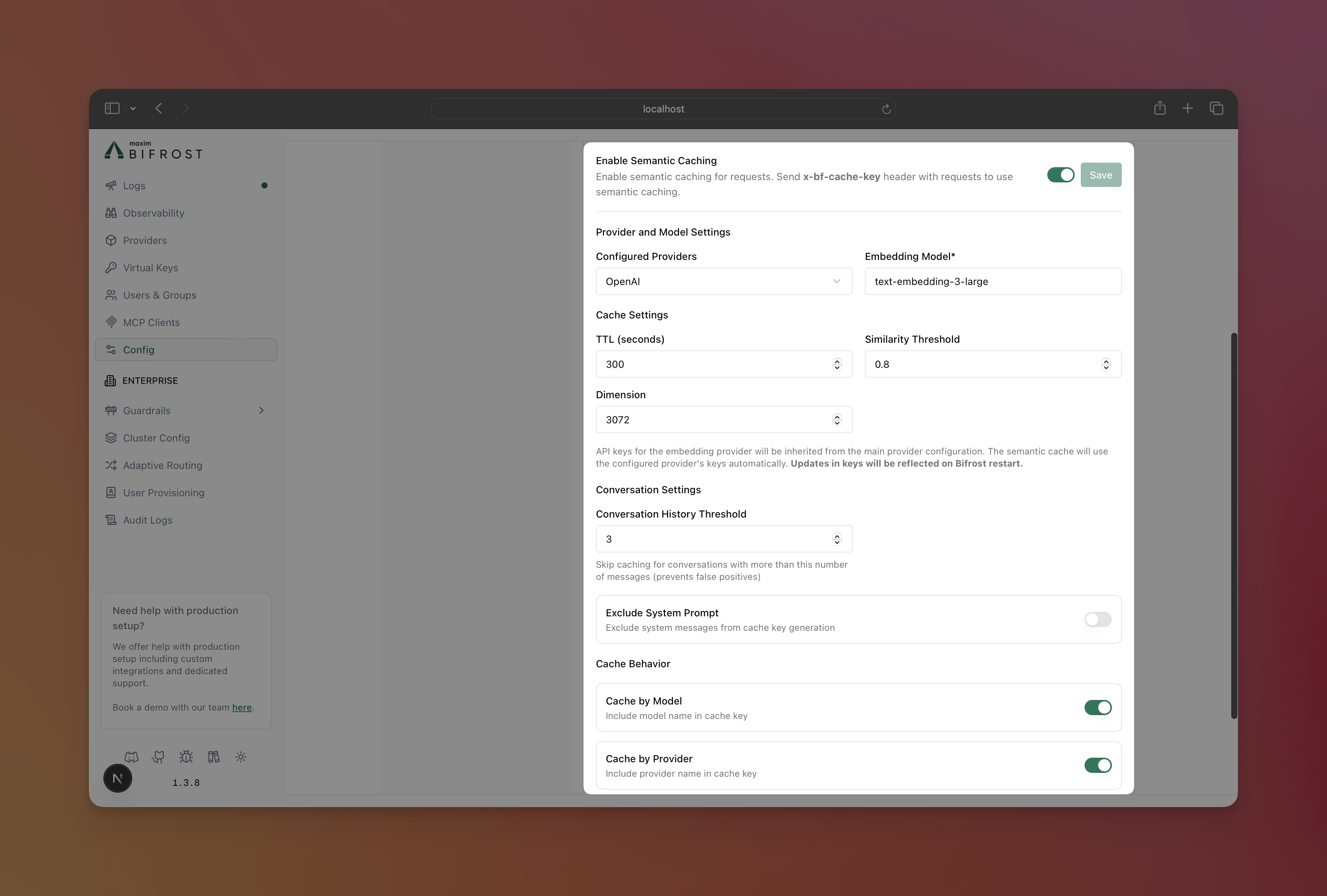
Note: Make sure you have a vector store setup (using config.json) before configuring the semantic cache plugin.
-
Navigate to Settings
- Open DeepIntShield UI at
http://localhost:8080 - Go to Settings.
- Open DeepIntShield UI at
-
Configure Semantic Cache Plugin
- Toggle the plugin switch to enable it, and fill in the required fields.
Required Fields:
- Provider: The provider to use for caching.
- Embedding Model: The embedding model to use for caching.
Note: Changes will need a restart of the DeepIntShield server to take effect, because the plugin is loaded on startup only.
{  "plugins": [    {      "enabled": true,      "name": "semantic_cache",      "config": {        "provider": "openai",        "embedding_model": "text-embedding-3-small",
        "cleanup_on_shutdown": true,        "ttl": "5m",        "threshold": 0.8,
        "conversation_history_threshold": 3,        "exclude_system_prompt": false,
"cache_by_model": true, "cache_by_provider": true } } ]}Note: All the available keys will be taken from the provider config on initialization, so make sure to add the keys to the provider you have specified in the config. Any updates to the keys will not be reflected until next restart.
TTL Format Options:
- Duration strings:
"30s","5m","1h","24h" - Numeric seconds:
300(5 minutes),3600(1 hour)
Direct Hash Mode (Embedding-Free)
Section titled “Direct Hash Mode (Embedding-Free)”Direct hash mode provides exact-match caching without requiring an embedding provider. Each request is hashed deterministically based on its normalized input, parameters, and stream flag. Identical requests produce cache hits; different wording is a cache miss.
When to use direct hash mode:
- You only need exact-match deduplication (no fuzzy/semantic matching)
- You cannot or do not want to call an external embedding API
- You want the lowest possible latency with zero embedding overhead
- Cost-sensitive environments where embedding API calls add up
To enable direct-only mode globally, omit the provider and keys fields from the plugin config. The plugin will automatically fall back to direct search only.
import (    "github.com/maximhq/deepintshield/plugins/semanticcache")
cacheConfig := &semanticcache.Config{    // No Provider, Keys, or EmbeddingModel -- direct hash mode only    Dimension: 1, // Placeholder; entries are stored as metadata-only (no embedding vectors). Change dimension before switching to dual-layer mode to avoid mixed-dimension issues.
    TTL:               5 * time.Minute,    CleanUpOnShutdown: true,    CacheByModel:      deepintshield.Ptr(true),    CacheByProvider:   deepintshield.Ptr(true),}
plugin, err := semanticcache.Init(ctx, cacheConfig, logger, store)deepintshield: plugins: semanticCache: enabled: true config: dimension: 1 ttl: "5m" cleanup_on_shutdown: true cache_by_model: true cache_by_provider: true{ "plugins": [ { "enabled": true, "name": "semantic_cache", "config": { "dimension": 1, "ttl": "5m", "cleanup_on_shutdown": true, "cache_by_model": true, "cache_by_provider": true } } ]}When initialized this way, all requests automatically use direct hash matching regardless of the x-bf-cache-type header. No embeddings are generated, and no embedding provider credentials are needed.
Recommended Vector Store
Section titled “Recommended Vector Store”Redis/Valkey-compatible stores are recommended for direct hash mode. They do not require vectors for metadata-only entries, and all cache fields are indexed as TAG fields for fast exact-match lookups.
vectorStore: enabled: true type: redis redis: external: enabled: true host: "redis-or-valkey.example.com" port: 6379 password: "your-redis-password"{ "vector_store": { "enabled": true, "type": "redis", "config": { "addr": "localhost:6379" } }}Per-Request Cache Type Override
Section titled “Per-Request Cache Type Override”When the plugin is initialized without an embedding provider (direct-only mode), all requests use direct hash matching automatically. The x-bf-cache-type header has no effect.
When the plugin is initialized with an embedding provider (dual-layer mode), you can force direct-only matching on specific requests using the x-bf-cache-type: direct header. See Cache Type Control for details.
Cache Triggering
Section titled “Cache Triggering”Must set cache key in request context:
// This request WILL be cachedctx = context.WithValue(ctx, semanticcache.CacheKey, "session-123")response, err := client.ChatCompletionRequest(schemas.NewDeepIntShieldContext(ctx, schemas.NoDeadline), request)
// This request will NOT be cached (no context value)response, err := client.ChatCompletionRequest(schemas.NewDeepIntShieldContext(context.Background(), schemas.NoDeadline), request)
Must set cache key in request header x-bf-cache-key:
# This request WILL be cachedcurl -H "x-bf-cache-key: session-123" ...
# This request will NOT be cached (no header)curl ...
Per-Request Overrides
Section titled “Per-Request Overrides”Workspace-level settings (configured under Governance Hub → Cost Optimization) are the default for every request. Any individual call can override them by sending one of the following headers — useful for batch jobs that need a longer TTL, evals that should bypass the cache, or hot paths that want a stricter similarity threshold.
| Header | Effect |
|---|---|
x-bf-cache-ttl | Override the semantic cache TTL for this request (e.g. 30s, 5m, 3600). |
x-bf-cache-threshold | Override the similarity threshold for this request (0.0–1.0). |
x-bf-cache-type | Force a specific cache type for this request: direct or semantic. |
x-bf-cache-no-store | Set to true to read from the cache but not write the new response back. |
x-bf-cache-key | Provide an explicit cache key for direct hash matching (skips semantic lookup). |
Override default TTL and similarity threshold per request:
You can set TTL and threshold in the request context, in the keys you configured in the plugin config:
// Go SDK: Custom TTL and thresholdctx = context.WithValue(ctx, semanticcache.CacheKey, "session-123")ctx = context.WithValue(ctx, semanticcache.CacheTTLKey, 30*time.Second)ctx = context.WithValue(ctx, semanticcache.CacheThresholdKey, 0.9)You can set TTL and threshold in the request headers x-bf-cache-ttl and x-bf-cache-threshold:
# HTTP: Custom TTL and thresholdcurl -H "x-bf-cache-key: session-123" \ -H "x-bf-cache-ttl: 30s" \ -H "x-bf-cache-threshold: 0.9" ...Advanced Cache Control
Section titled “Advanced Cache Control”Cache Type Control
Section titled “Cache Type Control”Control which caching mechanism to use per request:
// Use only direct hash matching (fastest)ctx = context.WithValue(ctx, semanticcache.CacheKey, "session-123")ctx = context.WithValue(ctx, semanticcache.CacheTypeKey, semanticcache.CacheTypeDirect)
// Use only semantic similarity searchctx = context.WithValue(ctx, semanticcache.CacheKey, "session-123")ctx = context.WithValue(ctx, semanticcache.CacheTypeKey, semanticcache.CacheTypeSemantic)
// Default behavior: Direct + semantic fallback (if not specified)ctx = context.WithValue(ctx, semanticcache.CacheKey, "session-123")# Direct hash matching onlycurl -H "x-bf-cache-key: session-123" \ -H "x-bf-cache-type: direct" ...
# Semantic similarity search onlycurl -H "x-bf-cache-key: session-123" \ -H "x-bf-cache-type: semantic" ...
# Default: Both (if header not specified)curl -H "x-bf-cache-key: session-123" ...No-Store Control
Section titled “No-Store Control”Disable response caching while still allowing cache reads:
// Read from cache but don't store the responsectx = context.WithValue(ctx, semanticcache.CacheKey, "session-123")ctx = context.WithValue(ctx, semanticcache.CacheNoStoreKey, true)# Read from cache but don't store responsecurl -H "x-bf-cache-key: session-123" \ -H "x-bf-cache-no-store: true" ...Conversation Configuration
Section titled “Conversation Configuration”History Threshold Logic
Section titled “History Threshold Logic”The ConversationHistoryThreshold setting skips caching for conversations with many messages to prevent false positives:
Why this matters:
- Semantic False Positives: Long conversation histories have high probability of semantic matches with unrelated conversations due to topic overlap
- Direct Cache Inefficiency: Long conversations rarely have exact hash matches, making direct caching less effective
- Performance: Reduces vector store load by filtering out low-value caching scenarios
{ "conversation_history_threshold": 3 // Skip caching if > 3 messages in conversation}Recommended Values:
- 1-2: Very conservative (may miss valuable caching opportunities)
- 3-5: Balanced approach (default: 3)
- 10+: Cache longer conversations (higher false positive risk)
System Prompt Handling
Section titled “System Prompt Handling”Control whether system messages are included in cache key generation:
{ "exclude_system_prompt": false // Include system messages in cache key (default)}When to exclude (true):
- System prompts change frequently but content is similar
- Multiple system prompt variations for same use case
- Focus caching on user content similarity
When to include (false):
- System prompts significantly change response behavior
- Each system prompt requires distinct cached responses
- Strict response consistency requirements
Cache Management
Section titled “Cache Management”Cache Metadata Location
Section titled “Cache Metadata Location”When responses are served from semantic cache, 3 key variables are automatically added to the response:
Location: response.ExtraFields.CacheDebug (as a JSON object)
Fields:
CacheHit(boolean):trueif the response was served from the cache,falsewhen lookup fails.HitType(string):"semantic"for similarity match,"direct"for hash matchCacheID(string): Unique cache entry ID for management operations (present only for cache hits)
Semantic Cache Only:
ProviderUsed(string): Provider used for the calculating semantic match embedding. (present for both cache hits and misses)ModelUsed(string): Model used for the calculating semantic match embedding. (present for both cache hits and misses)InputTokens(number): Number of tokens extracted from the request for the semantic match embedding calculation. (present for both cache hits and misses)Threshold(number): Similarity threshold used for the match. (present only for cache hits)Similarity(number): Similarity score for the match. (present only for cache hits)
Example HTTP Response:
{  "extra_fields": {    "cache_debug": {      "cache_hit": true,      "hit_type": "direct",      "cache_id": "550e8500-e29b-41d4-a725-446655440001",    }  }}
{  "extra_fields": {    "cache_debug": {      "cache_hit": true,      "hit_type": "semantic",      "cache_id": "550e8500-e29b-41d4-a725-446655440001",      "threshold": 0.8,      "similarity": 0.95,      "provider_used": "openai",      "model_used": "gpt-4o-mini",      "input_tokens": 100    }  }}
{  "extra_fields": {    "cache_debug": {      "cache_hit": false,      "provider_used": "openai",      "model_used": "gpt-4o-mini",      "input_tokens": 20    }  }}
These variables allow you to detect cached responses and get the cache entry ID needed for clearing specific entries.
Clear Specific Cache Entry
Section titled “Clear Specific Cache Entry”Use the request ID from cached responses to clear specific entries:
// Clear specific entry by request IDerr := plugin.ClearCacheForRequestID("550e8400-e29b-41d4-a716-446655440000")
// Clear all entries for a cache keyerr := plugin.ClearCacheForKey("support-session-456")# Clear specific cached entry by request IDcurl -X DELETE http://localhost:8080/api/cache/clear/550e8400-e29b-41d4-a716-446655440000
# Clear all entries for a cache keycurl -X DELETE http://localhost:8080/api/cache/clear-by-key/support-session-456Cache Lifecycle & Cleanup
Section titled “Cache Lifecycle & Cleanup”The semantic cache automatically handles cleanup to prevent storage bloat:
Automatic Cleanup:
- TTL Expiration: Entries are automatically removed when TTL expires
- Shutdown Cleanup: All cache entries are cleared from the vector store namespace and the namespace itself when DeepIntShield client shuts down
- Namespace Isolation: Each DeepIntShield instance uses isolated vector store namespaces to prevent conflicts
Manual Cleanup Options:
- Clear specific entries by request ID (see examples above)
- Clear all entries for a cache key
- Restart DeepIntShield to clear all cache data