
OpenTelemetry (OTel)
Overview
Section titled “Overview”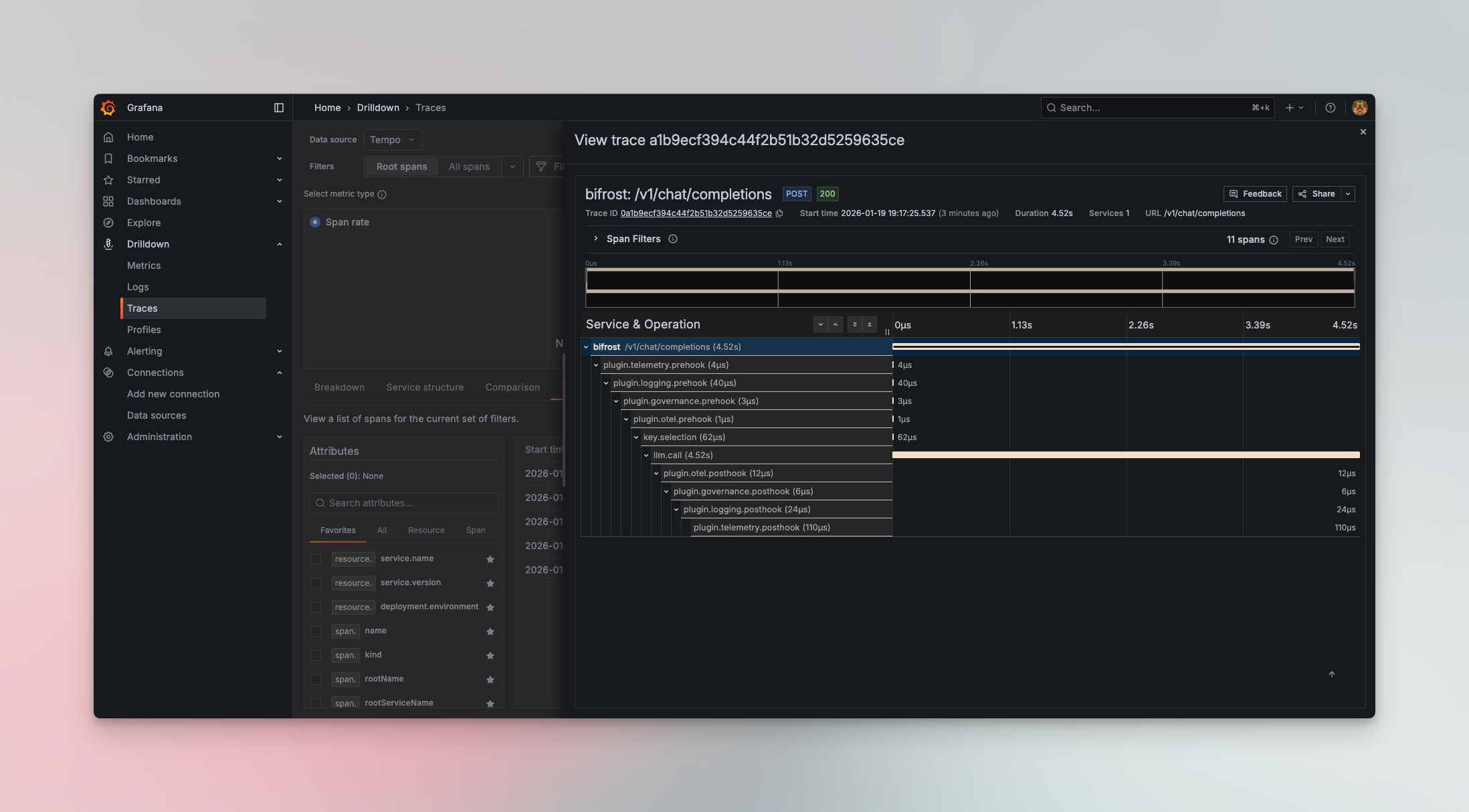
The OTel plugin enables seamless integration with OpenTelemetry Protocol (OTLP) collectors, allowing you to send LLM traces to your existing observability infrastructure. Connect DeepIntShield to platforms like Grafana Cloud, Datadog, New Relic, Honeycomb, or self-hosted collectors.
All traces follow OpenTelemetry semantic conventions, making it easy to correlate LLM operations with your broader application telemetry.
Supported Trace Formats
Section titled “Supported Trace Formats”The plugin supports multiple trace formats to match your observability platform:
| Format | Description | Use Case | Status |
|---|---|---|---|
genai_extension | OpenTelemetry GenAI semantic conventions | Recommended - Standard OTel format with rich LLM metadata | ✅ Released |
vercel | Vercel AI SDK format | For Vercel AI SDK compatibility | 🔄 Coming soon |
open_inference | Arize OpenInference format | For Arize Phoenix and OpenInference tools | 🔄 Coming soon |
Configuration
Section titled “Configuration”Required Fields
Section titled “Required Fields”| Field | Type | Required | Description |
|---|---|---|---|
service_name | string | ❌ No | Service name to be used for tracing, defaults to deepintshield |
collector_url | string | ✅ Yes | OTLP collector endpoint URL |
trace_type | string | ✅ Yes | One of: genai_extension, vercel, open_inference |
protocol | string | ✅ Yes | Transport protocol: http or grpc |
headers | object | ❌ No | Custom headers for authentication (supports env.VAR_NAME) |
tls_ca_cert | string | ❌ No | File path to client CA certificate for TLS. Optional. Works with both gRPC and HTTP protocol |
Environment Variable Substitution
Section titled “Environment Variable Substitution”Headers support environment variable substitution using the env. prefix:
{ "headers": { "Authorization": "env.OTEL_API_KEY", "X-Custom-Header": "env.CUSTOM_VALUE" }}Resource Attributes
Section titled “Resource Attributes”The plugin supports the standard OTEL_RESOURCE_ATTRIBUTES environment variable. Any attributes defined in this variable will be automatically attached to every span emitted by the plugin.
export OTEL_RESOURCE_ATTRIBUTES="deployment.environment=production,service.version=1.2.3,team.name=platform"These attributes appear as resource-level metadata on all traces:
{ "resource": { "attributes": { "service.name": "deepintshield", "deployment.environment": "production", "service.version": "1.2.3", "team.name": "platform" } }}This is useful for:
- Environment identification - Distinguish between production, staging, and development traces
- Service versioning - Track which version of your service generated the trace
- Team attribution - Tag traces with team ownership for filtering and alerting
- Custom metadata - Add any key-value pairs relevant to your observability needs
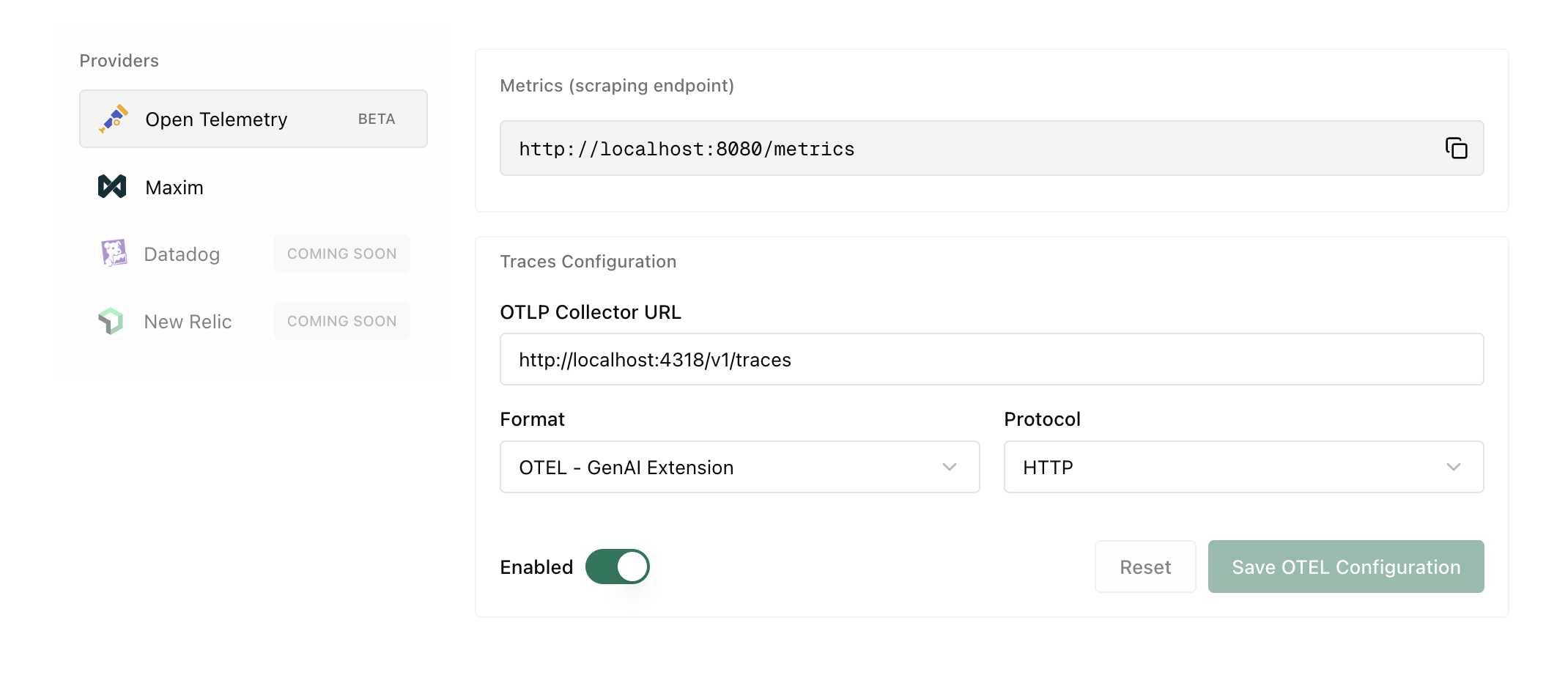
package main
import (    "context"    deepintshield "github.com/maximhq/deepintshield/core"    "github.com/maximhq/deepintshield/core/schemas"    "github.com/maximhq/deepintshield/framework/pricing"    otel "github.com/maximhq/deepintshield/plugins/otel")
func main() {    ctx := context.Background()    logger := schemas.NewLogger()
    // Initialize pricing manager (required for cost calculation)    pricingManager := pricing.NewPricingManager(logger)
    // Initialize OTel plugin    otelPlugin, err := otel.Init(ctx, &otel.Config{        ServiceName:  "deepintshield",        CollectorURL: "http://localhost:4318",        TraceType:    otel.TraceTypeGenAIExtension,        Protocol:     otel.ProtocolHTTP,        Headers: map[string]string{            "Authorization": "env.OTEL_API_KEY",        },    }, logger, pricingManager)    if err != nil {        panic(err)    }
    // Initialize DeepIntShield with the plugin    client, err := deepintshield.Init(ctx, schemas.DeepIntShieldConfig{        Account: &yourAccount,        LLMPlugins: []schemas.LLMPlugin{otelPlugin},    })    if err != nil {        panic(err)    }    defer client.Shutdown()
    // All requests are now traced to OTel collector}
For Gateway mode, configure via config.json:
{ "plugins": [ { "enabled": true, "name": "otel", "config": { "service_name": "deepintshield", "collector_url": "http://localhost:4318", "trace_type": "genai_extension", "protocol": "http", "headers": { "Authorization": "env.OTEL_API_KEY" } } } ]}If you need to connect to an OTEL collector that requires TLS, configure tls_ca_cert:
{ "plugins": [ { "enabled": true, "name": "otel", "config": { "service_name": "deepintshield", "collector_url": "localhost:4317", "trace_type": "genai_extension", "protocol": "grpc", "tls_ca_cert": "/path/to/your/ca.cert", "headers": { "Authorization": "env.OTEL_API_KEY" } } } ]}Quick Start with Docker
Section titled “Quick Start with Docker”Get started quickly with a complete observability stack using the included Docker Compose configuration:
services:  otel-collector:    image: otel/opentelemetry-collector-contrib:latest    container_name: otel-collector    command: ["--config=/etc/otelcol/config.yaml"]    configs:      - source: otel-collector-config        target: /etc/otelcol/config.yaml    ports:      - "4317:4317"   # OTLP gRPC      - "4318:4318"   # OTLP HTTP      - "8888:8888"   # Collector /metrics      - "9464:9464"   # Prometheus scrape endpoint      - "13133:13133" # Health check      - "1777:1777"   # pprof      - "55679:55679" # zpages    restart: unless-stopped    depends_on:      - tempo
  tempo:    image: grafana/tempo:latest    container_name: tempo    command: [ "-config.file=/etc/tempo.yaml" ]    configs:      - source: tempo-config        target: /etc/tempo.yaml    ports:      - "3200:3200"   # tempo HTTP API    expose:      - "4317"        # OTLP gRPC (internal)    volumes:      - tempo-data:/var/tempo    restart: unless-stopped
  prometheus:    image: prom/prometheus:latest    container_name: prometheus    depends_on:      - otel-collector    command:      - "--config.file=/etc/prometheus/prometheus.yml"      - "--storage.tsdb.path=/prometheus"      - "--web.console.libraries=/usr/share/prometheus/console_libraries"      - "--web.console.templates=/usr/share/prometheus/consoles"      - "--web.enable-remote-write-receiver"    ports:      - "9090:9090"    volumes:      - prometheus-data:/prometheus    configs:      - source: prometheus-config        target: /etc/prometheus/prometheus.yml    restart: unless-stopped
  grafana:    image: grafana/grafana:latest    container_name: grafana    depends_on:      - prometheus      - tempo    environment:      GF_SECURITY_ADMIN_USER: admin      GF_SECURITY_ADMIN_PASSWORD: admin      GF_AUTH_ANONYMOUS_ENABLED: "true"      GF_AUTH_ANONYMOUS_ORG_ROLE: Viewer      GF_PLUGINS_ALLOW_LOADING_UNSIGNED_PLUGINS: "grafana-pyroscope-app,grafana-exploretraces-app,grafana-metricsdrilldown-app"      GF_PLUGINS_ENABLE_ALPHA: "true"      GF_INSTALL_PLUGINS: ""    ports:      - "4000:3000"    volumes:      - grafana-data:/var/lib/grafana    configs:      - source: grafana-datasources        target: /etc/grafana/provisioning/datasources/datasources.yml    restart: unless-stopped
configs:  otel-collector-config:    content: |      receivers:        otlp:          protocols:            grpc:              endpoint: 0.0.0.0:4317            http:              endpoint: 0.0.0.0:4318
      processors:        batch:
      exporters:        prometheus:          endpoint: 0.0.0.0:9464          namespace: otel          const_labels:            source: otelcol
        otlp/tempo:          endpoint: tempo:4317          tls:            insecure: true
        debug:          verbosity: detailed
      extensions:        health_check:          endpoint: 0.0.0.0:13133        pprof:          endpoint: 0.0.0.0:1777        zpages:          endpoint: 0.0.0.0:55679
      service:        extensions: [health_check, pprof, zpages]        telemetry:          logs:            level: debug          metrics:            level: detailed        pipelines:          traces:            receivers: [otlp]            processors: [batch]            exporters: [debug, otlp/tempo]          metrics:            receivers: [otlp]            processors: [batch]            exporters: [debug, prometheus]          logs:            receivers: [otlp]            processors: [batch]            exporters: [debug]
  tempo-config:    content: |      server:        http_listen_port: 3200        log_level: info
      distributor:        receivers:          otlp:            protocols:              grpc:                endpoint: 0.0.0.0:4317
      ingester:        max_block_duration: 5m        trace_idle_period: 10s
      compactor:        compaction:          block_retention: 1h
      storage:        trace:          backend: local          wal:            path: /var/tempo/wal          local:            path: /var/tempo/blocks
      metrics_generator:        registry:          external_labels:            source: tempo        storage:          path: /var/tempo/generator/wal          remote_write:            - url: http://prometheus:9090/api/v1/write
  prometheus-config:    content: |      global:        scrape_interval: 15s      scrape_configs:        - job_name: "otelcol-internal"          static_configs:            - targets: ["otel-collector:8888"]        - job_name: "otelcol-exporter"          static_configs:            - targets: ["otel-collector:9464"]        - job_name: "tempo"          static_configs:            - targets: ["tempo:3200"]
  grafana-datasources:    content: |      apiVersion: 1      datasources:        - name: Prometheus          uid: prometheus          type: prometheus          access: proxy          orgId: 1          url: http://prometheus:9090          isDefault: true          editable: true        - name: Tempo          uid: tempo          type: tempo          access: proxy          orgId: 1          url: http://tempo:3200          editable: true          jsonData:            tracesToMetrics:              datasourceUid: prometheus            nodeGraph:              enabled: true
volumes:  prometheus-data:  grafana-data:  tempo-data:
This launches:
- OTel Collector - Receives traces on ports 4317 (gRPC) and 4318 (HTTP)
- Tempo - Distributed tracing backend
- Prometheus - Metrics collection
- Grafana - Visualization dashboard
Access Grafana at http://localhost:3000 (default credentials: admin/admin)
Popular Platform Integrations
Section titled “Popular Platform Integrations”{ "plugins": [ { "enabled": true, "name": "otel", "config": { "service_name": "deepintshield", "collector_url": "https://otlp-gateway-prod-us-central-0.grafana.net/otlp", "trace_type": "genai_extension", "protocol": "http", "headers": { "Authorization": "env.GRAFANA_CLOUD_API_KEY" } } } ]}Set environment variable:
export GRAFANA_CLOUD_API_KEY="Basic <your-base64-encoded-token>"{ "plugins": [ { "enabled": true, "name": "otel", "config": { "service_name": "deepintshield", "collector_url": "https://trace.agent.datadoghq.com", "trace_type": "genai_extension", "protocol": "http", "headers": { "DD-API-KEY": "env.DATADOG_API_KEY" } } } ]}Set environment variable:
export DATADOG_API_KEY="your-datadog-api-key"{ "plugins": [ { "enabled": true, "name": "otel", "config": { "service_name": "deepintshield", "collector_url": "https://otlp.nr-data.net:4318", "trace_type": "genai_extension", "protocol": "http", "headers": { "api-key": "env.NEW_RELIC_LICENSE_KEY" } } } ]}Set environment variable:
export NEW_RELIC_LICENSE_KEY="your-license-key"{ "plugins": [ { "enabled": true, "name": "otel", "config": { "service_name": "deepintshield", "collector_url": "https://api.honeycomb.io", "trace_type": "genai_extension", "protocol": "http", "headers": { "x-honeycomb-team": "env.HONEYCOMB_API_KEY", "x-honeycomb-dataset": "deepintshield-traces" } } } ]}Set environment variable:
export HONEYCOMB_API_KEY="your-api-key"Langfuse is an open-source LLM observability platform that accepts OpenTelemetry traces via its OTLP endpoint.
Configure the OTel plugin with the following settings:
| Field | Value |
|---|---|
| Collector URL | https://cloud.langfuse.com/api/public/otel (EU) or https://us.cloud.langfuse.com/api/public/otel (US) |
| Trace Type | genai_extension |
| Protocol | http (required - Langfuse does not support gRPC) |
| Headers | Authorization: env.LANGFUSE_AUTH |
{ "plugins": [ { "enabled": true, "name": "otel", "config": { "service_name": "deepintshield", "collector_url": "https://cloud.langfuse.com/api/public/otel", "trace_type": "genai_extension", "protocol": "http", "headers": { "Authorization": "env.LANGFUSE_AUTH" } } } ]}For US region, use https://us.cloud.langfuse.com/api/public/otel instead.
Set up the environment variable with your Langfuse API keys:
# Generate base64 auth string from your Langfuse API keysexport LANGFUSE_AUTH="Basic $(echo -n 'pk-lf-xxx:sk-lf-xxx' | base64)"Replace pk-lf-xxx and sk-lf-xxx with your Langfuse public and secret keys from your project settings.
See the Langfuse OpenTelemetry documentation for more details.
Use the included Docker Compose stack or point to your own collector:
{ "plugins": [ { "enabled": true, "name": "otel", "config": { "service_name": "deepintshield", "collector_url": "http://your-collector:4318", "trace_type": "genai_extension", "protocol": "http" } } ]}Captured Data
Section titled “Captured Data”Each trace includes comprehensive LLM operation metadata following OpenTelemetry semantic conventions:
Span Attributes
Section titled “Span Attributes”- Span Name: Based on request type (
gen_ai.chat,gen_ai.text,gen_ai.embedding, etc.) - Service Info:
service.name=deepintshield,service.version - Provider & Model:
gen_ai.provider.name,gen_ai.request.model
Request Parameters
Section titled “Request Parameters”- Temperature, max_tokens, top_p, stop sequences
- Presence/frequency penalties
- Tool configurations and parallel tool calls
- Custom parameters via
ExtraParams
Input/Output Data
Section titled “Input/Output Data”- Complete chat history with role-based messages
- Prompt text for completions
- Response content with role attribution
- Tool calls and results
Performance Metrics
Section titled “Performance Metrics”- Token usage (prompt, completion, total)
- Cost calculations in dollars
- Latency and timing (start/end timestamps)
- Error details with status codes
Example Span
Section titled “Example Span”{ "name": "gen_ai.chat", "attributes": { "gen_ai.provider.name": "openai", "gen_ai.request.model": "gpt-4", "gen_ai.request.temperature": 0.7, "gen_ai.request.max_tokens": 1000, "gen_ai.usage.prompt_tokens": 45, "gen_ai.usage.completion_tokens": 128, "gen_ai.usage.total_tokens": 173, "gen_ai.usage.cost": 0.0052 }}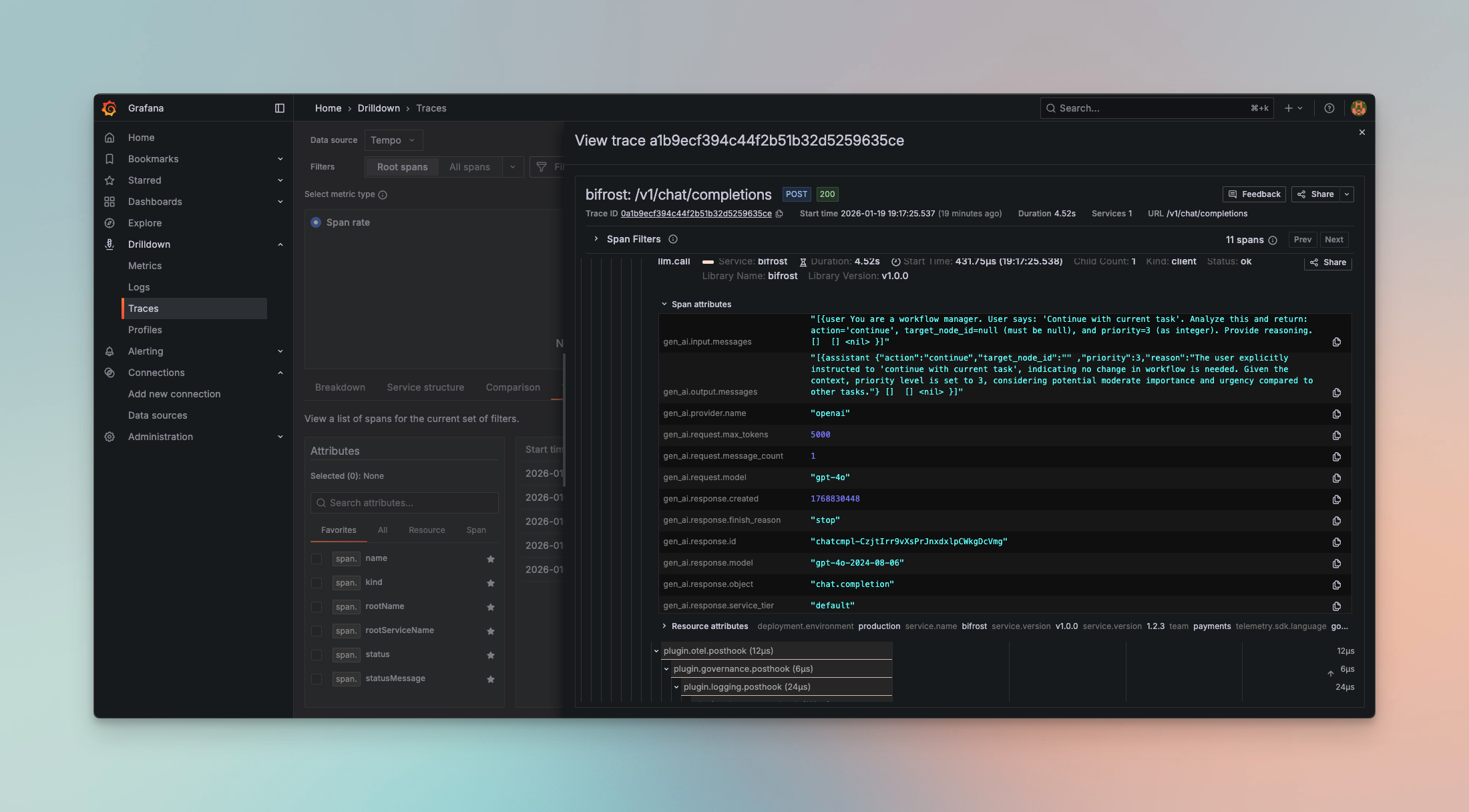
Supported Request Types
Section titled “Supported Request Types”The OTel plugin captures all DeepIntShield request types:
- Chat Completion (streaming and non-streaming) →
gen_ai.chat - Text Completion (streaming and non-streaming) →
gen_ai.text - Embeddings →
gen_ai.embedding - Speech Generation (streaming and non-streaming) →
gen_ai.speech - Transcription (streaming and non-streaming) →
gen_ai.transcription - Responses API →
gen_ai.responses
Protocol Support
Section titled “Protocol Support”HTTP (OTLP/HTTP)
Section titled “HTTP (OTLP/HTTP)”Uses HTTP/1.1 or HTTP/2 with JSON or Protobuf encoding:
{ "collector_url": "http://localhost:4318", "protocol": "http"}Default port: 4318
gRPC (OTLP/gRPC)
Section titled “gRPC (OTLP/gRPC)”Uses gRPC with Protobuf encoding for lower latency:
{ "collector_url": "localhost:4317", "protocol": "grpc"}Default port: 4317
Metrics Push (Cluster Mode)
Section titled “Metrics Push (Cluster Mode)”The OTel plugin supports push-based metrics export via OTLP, which is essential for multi-node cluster deployments. Instead of relying on Prometheus scraping each node’s /metrics endpoint (which can miss nodes behind a load balancer), all nodes actively push metrics to a central OTEL Collector.
Configuration
Section titled “Configuration”| Field | Type | Required | Description |
|---|---|---|---|
metrics_enabled | boolean | ❌ No | Enable push-based metrics export (default: false) |
metrics_endpoint | string | ✅ Yes (if enabled) | OTLP metrics endpoint URL |
metrics_push_interval | integer | ❌ No | Push interval in seconds (default: 15, range: 1-300) |
Example Configuration
Section titled “Example Configuration”{ "plugins": [ { "enabled": true, "name": "otel", "config": { "service_name": "deepintshield", "collector_url": "http://otel-collector:4318/v1/traces", "trace_type": "genai_extension", "protocol": "http", "metrics_enabled": true, "metrics_endpoint": "http://otel-collector:4318/v1/metrics", "metrics_push_interval": 15 } } ]}{ "plugins": [ { "enabled": true, "name": "otel", "config": { "service_name": "deepintshield", "collector_url": "otel-collector:4317", "trace_type": "genai_extension", "protocol": "grpc", "metrics_enabled": true, "metrics_endpoint": "otel-collector:4317", "metrics_push_interval": 15 } } ]}Pushed Metrics
Section titled “Pushed Metrics”These are the same Prometheus-style metrics from the telemetry plugin, pushed via OTLP protocol to a central collector:
| Metric | Type | Description |
|---|---|---|
bifrost_upstream_requests_total | Counter | Total requests to upstream providers |
bifrost_success_requests_total | Counter | Successful upstream requests |
bifrost_error_requests_total | Counter | Error requests with reason labels |
bifrost_input_tokens_total | Counter | Total input tokens |
bifrost_output_tokens_total | Counter | Total output tokens |
bifrost_cache_hits_total | Counter | Cache hits |
bifrost_cost_total | Counter | Total cost in USD |
bifrost_upstream_latency_seconds | Histogram | Upstream request latency |
bifrost_stream_first_token_latency_seconds | Histogram | Time to first token |
bifrost_stream_inter_token_latency_seconds | Histogram | Inter-token latency |
http_requests_total | Counter | Total HTTP requests |
http_request_duration_seconds | Histogram | HTTP request duration |
OTEL Collector Configuration
Section titled “OTEL Collector Configuration”Configure your OTEL Collector to receive OTLP metrics and export to your preferred backend (Datadog, Prometheus, etc.):
receivers:  otlp:    protocols:      grpc:        endpoint: 0.0.0.0:4317      http:        endpoint: 0.0.0.0:4318
processors:  batch:    timeout: 10s    send_batch_size: 1000
exporters:  # For Datadog  datadog:    api:      key: ${DD_API_KEY}
  # Or for Prometheus remote write  prometheusremotewrite:    endpoint: "http://prometheus:9090/api/v1/write"
service:  pipelines:    metrics:      receivers: [otlp]      processors: [batch]      exporters: [datadog]  # or prometheusremotewrite
Why Push vs Pull?
Section titled “Why Push vs Pull?”| Aspect | Pull (/metrics scrape) | Push (OTEL metrics) |
|---|---|---|
| Load balancer | May miss nodes | All nodes push |
| Service discovery | Required | Not required |
| Scraper configuration | Per-node endpoints | Single collector |
| Cluster aggregation | Query-side sum() | Collector handles it |
For single-node deployments, pull-based /metrics scraping works well. For multi-node clusters, push-based metrics ensures all nodes are captured.
Advanced Features
Section titled “Advanced Features”Automatic Span Management
Section titled “Automatic Span Management”- Spans are tracked with a 20-minute TTL using an efficient sync.Map implementation
- Automatic cleanup prevents memory leaks for long-running processes
- Handles streaming requests with accumulator for chunked responses
Async Emission
Section titled “Async Emission”All span emissions happen asynchronously in background goroutines:
// Zero impact on request latencygo func() { p.client.Emit(ctx, spans)}()Streaming Support
Section titled “Streaming Support”The plugin accumulates streaming chunks and emits a single complete span when the stream finishes, providing accurate token counts and costs.
Environment Variable Security
Section titled “Environment Variable Security”Sensitive credentials never appear in config files:
{ "headers": { "Authorization": "env.OTEL_API_KEY" }}The plugin reads OTEL_API_KEY from the environment at runtime.
When to Use
Section titled “When to Use”OTel Plugin
Section titled “OTel Plugin”Choose the OTel plugin when you:
- Have existing OpenTelemetry infrastructure
- Need to correlate LLM traces with application traces
- Require compliance with enterprise observability standards
- Want vendor flexibility (switch backends without code changes)
- Need multi-service distributed tracing
vs. Built-in Observability
Section titled “vs. Built-in Observability”Use Built-in Observability for:
- Local development and testing
- Simple self-hosted deployments
- No external dependencies
- Direct database access to logs
vs. Maxim Plugin
Section titled “vs. Maxim Plugin”Use the Maxim Plugin for:
- Advanced LLM evaluation and testing
- Prompt engineering and experimentation
- Team collaboration and governance
- Production monitoring with alerts
- Dataset management and curation
Troubleshooting
Section titled “Troubleshooting”Connection Issues
Section titled “Connection Issues”Verify collector is reachable:
# Test HTTP endpointcurl -v http://localhost:4318/v1/traces
# Test gRPC endpoint (requires grpcurl)grpcurl -plaintext localhost:4317 list
Missing Traces
Section titled “Missing Traces”Check DeepIntShield logs for emission errors:
# Enable debug loggingdeepintshield-http --log-level debugAuthentication Failures
Section titled “Authentication Failures”Verify environment variables are set:
echo $OTEL_API_KEYNext Steps
Section titled “Next Steps”- Built-in Observability - Local logging for development
- Maxim Plugin - Advanced LLM evaluation and monitoring
- Telemetry - Prometheus metrics and dashboards