
Adaptive Load Balancing
Overview
Section titled “Overview”Adaptive Load Balancing in DeepIntShield Enterprise automatically optimizes traffic distribution across providers and keys based on real-time performance metrics. The system operates at two levels - provider selection (direction) and key selection (route) - continuously monitoring error rates, latency, and throughput to dynamically adjust weights, ensuring optimal performance and reliability.
Key Features
Section titled “Key Features”| Feature | Description |
|---|---|
| Dynamic Weight Adjustment | Automatically adjusts key weights based on performance metrics |
| Real-time Performance Monitoring | Tracks error rates, latency, and success rates per model-key combination |
| Cross-Node Synchronization | Gossip protocol ensures consistent weight information across all cluster nodes |
| Circuit Breaker Integration | Temporarily removes poorly performing keys from rotation |
| Fast Recovery | Momentum-based scoring helps routes recover quickly after transient failures |
Architecture
Section titled “Architecture”The load balancing system operates at two levels:
- Direction-level (provider + model): Decides which provider to use for a given model
- Route-level (provider + model + key): Decides which API key to use within a provider
This two-tier approach enables both macro-level provider selection and micro-level key optimization.
graph TB    Request["Incoming Request<br/>model: gpt-4"]
    subgraph DirectionSelection["Direction Selection"]        DS["Provider Selector<br/>Score-based selection"]        DP1["OpenAI<br/>score: 0.92"]        DP2["Azure<br/>score: 0.85"]        DP3["Anthropic<br/>score: 0.78"]    end
    subgraph RouteSelection["Route Selection"]        RS["Key Selector<br/>Weighted random"]        K1["Key 1<br/>weight: 850"]        K2["Key 2<br/>weight: 620"]        K3["Key 3<br/>weight: 45"]    end
    subgraph Tracker["Metrics Tracker"]        T["Real-time Metrics<br/>5-second recomputation"]        M1["Error Rate"]        M2["Latency Score"]        M3["Utilization"]    end
    Request --> DS    DS --> DP1 & DP2 & DP3    DP1 --> RS    RS --> K1 & K2 & K3    K1 --> Response["API Response"]    Response --> T    T --> M1 & M2 & M3    M1 & M2 & M3 -.->|"Update Weights"| DS & RS
How Weight Calculation Works
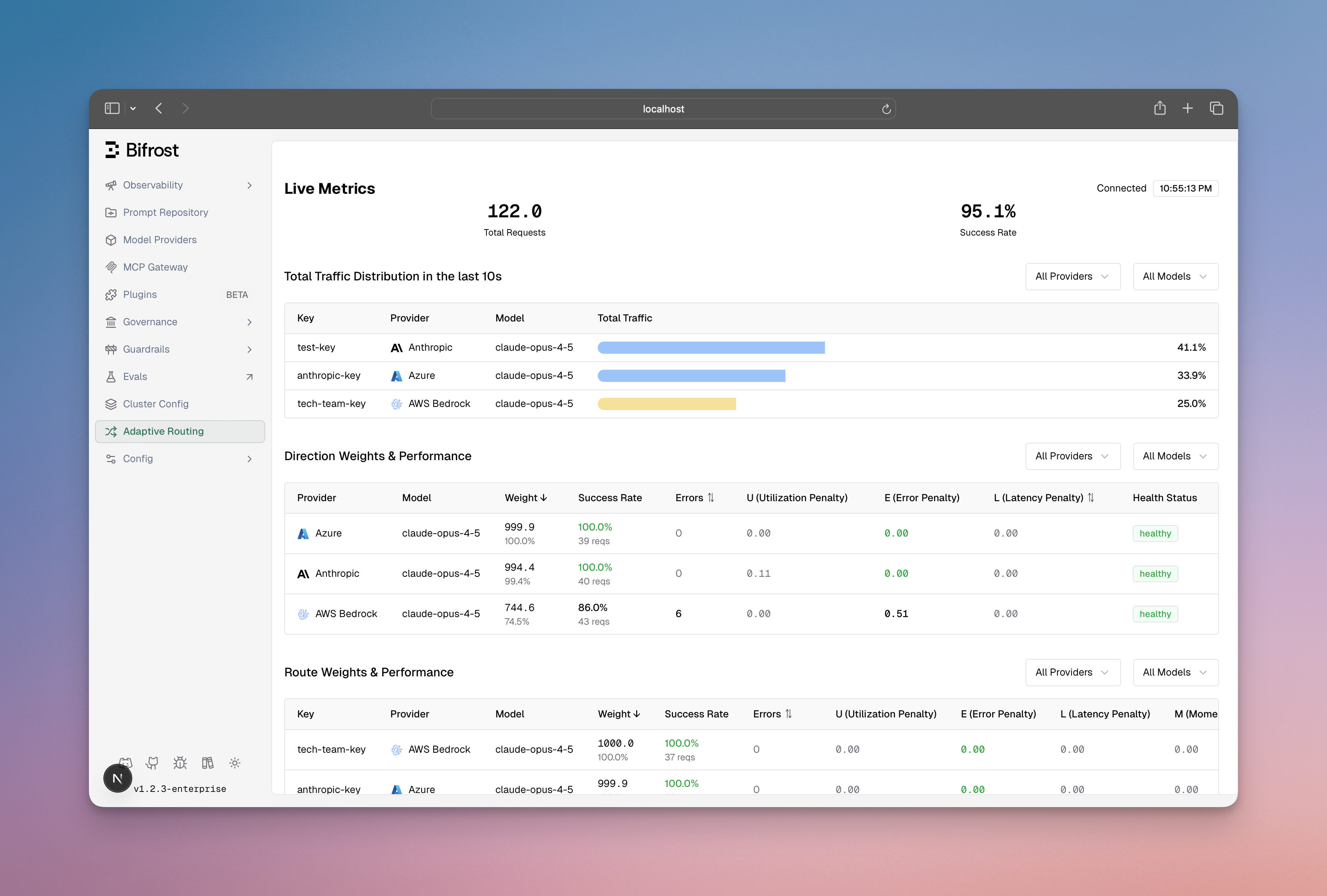
Section titled “How Weight Calculation Works”Every 5 seconds, the system recalculates weights for all routes based on four factors:
| Factor | Weight | Purpose |
|---|---|---|
| Error Penalty | 50% | Penalizes routes with high error rates |
| Latency Score | 20% | Penalizes routes with abnormally slow responses |
| Utilization Score | 5% | Prevents overloading high-performing routes |
| Momentum Bias | Additive | Rewards routes that are recovering well |
The system combines these into a single score, then converts it to a weight between 1 and 1000. Lower penalties mean higher weights, which means more traffic.
Score = (P_{error} \times 0.5) + (P_{latency} \times 0.2) + (P_{util} \times 0.05) - M_{momentum}Weight = W_{min} + (1 - Score) \times (W_{max} - W_{min})flowchart LR subgraph Inputs["Raw Metrics"] E["Error Rate"] L["Latency"] U["Utilization"] M["Momentum"] end
subgraph Scoring["Score Computation"] EP["Error Penalty<br/>50% weight"] LP["Latency Score<br/>20% weight"] US["Utilization Score<br/>5% weight"] MS["Momentum Bias"] end
subgraph Output["Final Weight"] NS["Normalized Score"] FW["Route Weight<br/>1 - 1000"] end
E --> EP L --> LP U --> US M --> MS EP & LP & US --> NS MS --> NS NS --> FWKey Capabilities
Section titled “Key Capabilities”-
Automatic Route Health Management: Routes automatically transition between 4 states (Healthy, Degraded, Failed, Recovering) based on error rates and latency. No manual intervention required when a route fails or recovers.
-
Fair Traffic Distribution: The system prevents any single route from being overloaded while still favoring better performers. Low-weight routes always get minimum traffic to prove recovery.
-
Real-time Dashboard: Provides visibility into weight distribution, performance metrics (error rates, latency), state transitions, and actual vs expected traffic per route.
-
Multi-Factor Scoring: Routes are scored using 4 components - Error Penalty (50% weight, time-decayed), Latency Score (token-aware via MV-TACOS algorithm), Utilization Score (fair-share balancing), and Momentum (accelerates recovery after failures).
-
Smart Key Selection: Uses weighted random selection with jitter (5% band) and 25% exploration probability to probe potentially recovered routes, rather than always picking the best route.
-
Performance Thresholds: Specific triggers drive state transitions —> 2% error rate triggers Degraded, >5% error rate or TPM hit triggers Failed, <2% error with 50%+ expected traffic triggers Healthy.
Next Steps
Section titled “Next Steps”Enable Adaptive Load Balancing
Section titled “Enable Adaptive Load Balancing”Contact your DeepIntShield Enterprise representative to enable adaptive load balancing for your deployment
Monitor Weight Distribution
Section titled “Monitor Weight Distribution”Use the dashboard to observe how weights adapt to real traffic patterns
Analyze Performance
Section titled “Analyze Performance”Review route state transitions and weight adjustments to understand system behavior